An access point turns a cabled network into Wi-Fi in a specific area: an office, a hotel corridor or a warehouse yard. It connects by network cable to a switch and broadcasts Wi-Fi around it, and several access points in one building form a single network that users move through without reconnecting. This is the overview guide: what an access point is, the main types, and how it differs from a router and a range extender.
AZEIDK supplies access points, switches and accessories as part of its network and communication systems, from brands including Alcatel-Lucent, HPE Aruba, Huawei, Ruijie, TP-Link and Hikvision, with design, installation and configuration per project.
Key points
- An access point broadcasts Wi-Fi from an existing wired network; it does not replace the router’s internet connection.
- Common types: ceiling for offices and halls, wall plate for hotel rooms and housing, outdoor for yards and car parks.
- Most modern access points take power over the network cable from a PoE switch.
- An extender repeats the signal wirelessly; an access point is cabled, so it performs more consistently in businesses.
- The number of access points depends on users, area and wall construction, not floor area alone.
What is an access point and how does it work?
A home unit often combines router, switch and Wi-Fi in one box. Businesses separate these jobs: a router or firewall connects to the internet, switches distribute cabling to each floor, and access points broadcast Wi-Fi in each zone. Every access point is cabled to a switch, taking data and usually power through PoE, so no socket is needed at the ceiling.
Access points are managed together from a controller or a cloud platform, so network names, passwords and guest separation are set once for all of them. One example is the TP-Link Omada OC300 and OC200 controllers.
Access point types by mounting location
| Type | Where it is used | Examples available from AZEIDK |
|---|---|---|
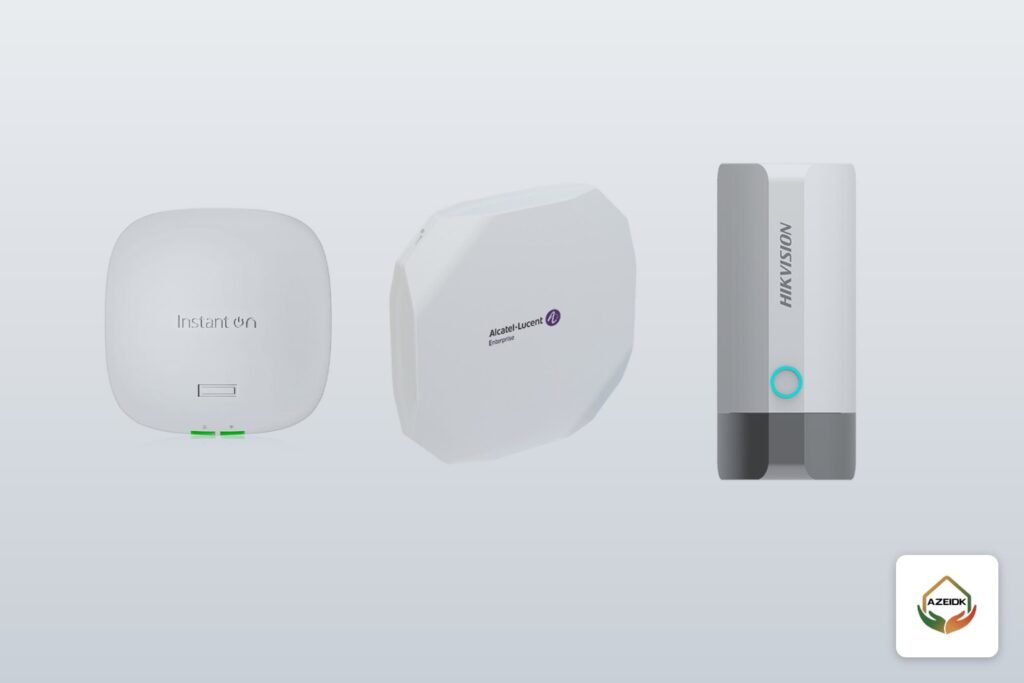
| Ceiling | Offices, meeting rooms, schools, shops | Alcatel-Lucent AP1301, HPE Instant On AP25 |
| Wall plate | Hotel rooms, housing, clinics with a wall data outlet | Huawei eKit AP162E, Ruijie RG-RAP1261, TP-Link EAP615-Wall |
| Outdoor | Yards, car parks, compounds, warehouse aprons | Hikvision DS-3WAP623E-SI, Alcatel-Lucent AP1360, HPE Instant On AP27 |
Each type has its own guide: wall plate access points for hotel rooms and the outdoor access point.
Wi-Fi generations: 6, 6E and 7
The generation sets speed and how many devices an access point serves efficiently. Wi-Fi 6 is the usual choice in projects today; according to the Wi-Fi Alliance, this generation introduced Wi-Fi in the 6 GHz band (known as Wi-Fi 6E), while Wi-Fi 7 works across the 2.4, 5 and 6 GHz bands. Wi-Fi 7 models available include the HPE Aruba AP-725 and Huawei eKit AP371. See Wi-Fi 7 access points for businesses.
A newer generation adds little if user devices are old or the switch and cabling cannot carry the extra speed, so decide the generation together with the switch and cable.
Router vs access point vs range extender
- Router: connects your network to the internet or another network and assigns addresses. It may have built-in Wi-Fi, but coverage is limited to where it sits.
- Access point: broadcasts Wi-Fi from an existing wired network, mounted where users are, in whatever number the building needs.
- Range extender (repeater): picks up the Wi-Fi signal and rebroadcasts it wirelessly. A quick fix for a distant room at home, but it depends on the signal it receives, so it is not relied on in business networks.
If one part of an office has weak Wi-Fi, an extra cabled access point is usually the steadier fix, not an extender.
How many access points do you need?
There is no fixed square-metre rule. Three factors decide: concurrent users per zone, wall and ceiling construction (concrete and metallised glass weaken the signal) and the type of use (email and browsing, or video calls and cameras). Design starts from the floor plan and a site survey; see business Wi-Fi network design.
Do not forget the switch: access points need a PoE switch with enough power budget, such as the TP-Link Omada SG2210MP. See network switch types and network cable types.
Choosing a brand
Brands differ more in management than in the radio itself: simple cloud management for branches and shops, or a central controller for large buildings. Compare Ruijie vs TP-Link Omada, Huawei networking and HPE Aruba Instant On.
Frequently asked questions
What is an access point?
A device that broadcasts Wi-Fi from a wired network, mounted on a ceiling, wall or outdoors, and cabled to a switch.
Does an access point replace the router?
No. The router connects to the internet; access points distribute Wi-Fi inside the building. You need both.
What is the difference between a router and an access point?
The router routes traffic between your network and the internet and assigns addresses; the access point turns the wired network into Wi-Fi in one area.
Does an access point need a power socket?
Most modern access points run on PoE from the switch over the network cable, so no socket is needed at the mounting point.
Is an access point better than an extender?
For businesses yes, because it is cabled and does not depend on a received wireless signal. Extenders suit simple home cases.
Indoor or outdoor access point for a yard?
Use an outdoor model built for external mounting; indoor units are not made for dust, heat and rain.
Planning Wi-Fi for an office, hotel or warehouse? Send us the floor plan and user count, and AZEIDK will size the access points and switches. Contact AZEIDK
Related guides
- Aramco iktva vs the Local Content Certificate: What Fire and Security Suppliers Need to Know
- Fire Blanket: When to Use It, Where to Mount It in Kitchens and Facilities, and How It Differs From an Extinguisher
- Honeywell Fire Alarm Systems in Saudi Arabia: Gent Vigilon Plus vs Notifier NFS2-640 vs Farenhyt IFP-2100
- Shurjoint Grooved Couplings for Fire Systems: Couplings, Fittings and Valves, Pressures, Approvals and Selection