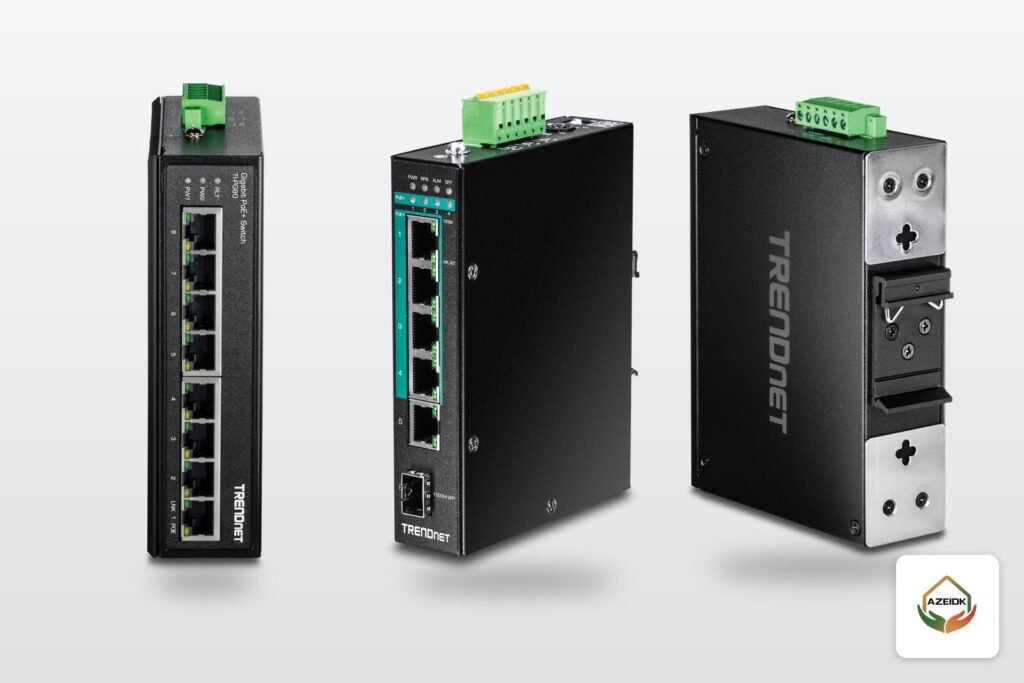
An industrial PoE switch is built for places an office switch was never meant to go: a steel cabinet on a production line, a pole box at a car park gate, or a control panel in a pump room. TRENDnet makes two compact DIN-rail models that AZEIDK supplies in Saudi Arabia, the managed TI-PG541i and the unmanaged TI-PG80. This guide compares them line by line from the TRENDnet datasheets and explains which one suits which job.
AZEIDK designs and installs network and communication systems and CCTV and access control for industrial facilities, and supplies the full TRENDnet range.
Key takeaways
- Both switches are metal DIN-rail units with dual 48 V DC power inputs, an alarm relay and up to 30 W per PoE+ port.
- The TI-PG541i is managed (VLAN, IGMP snooping, QoS, SNMP, PoE scheduling) with 4 PoE+ ports, 1 Gigabit port, 1 SFP slot and a 120 W PoE budget.
- The TI-PG80 is plug and play with 8 PoE+ ports, an IP50 housing, a -40 to 75 °C rating and a PoE budget the datasheet gives as 120 W to 200 W.
- Neither switch ships with a power supply: plan a 48 V DC DIN-rail supply in the same cabinet.
In this article
Industrial or desktop PoE switch: what actually changes?
A desktop PoE switch such as the TRENDnet TPE-TG82g is a good choice for a network rack or an office: 8 Gigabit PoE+ ports, a 65 W PoE budget and a fanless metal housing. Its datasheet, however, rates it for 0 to 40 °C, and it runs from a mains adapter.
The industrial models are different in four ways that matter on site:
- Temperature: the TI-PG80 is rated for -40 to 75 °C, and the TI-PG541i specification table gives -40 to 70 °C. A sealed cabinet in direct sun gets far hotter than an air-conditioned room.
- Mounting: both clip onto a standard DIN rail next to breakers, relays and PLCs, so no rack is needed.
- Power: both take 48 V DC on a removable terminal block, with a primary and a redundant input, so one failed supply does not stop the cameras.
- Alarm output: a relay contact changes state when a power input fails, so the fault can be wired to a PLC, an alarm panel or a monitoring input.
TI-PG541i vs TI-PG80: specification comparison
All values below are taken from the TRENDnet datasheets (TI-PG541i v1.0R, TI-PG80 v2.xR) attached to each product page.
| Item | TI-PG541i | TI-PG80 |
|---|---|---|
| Type | Layer 2 managed | Unmanaged (no configuration) |
| Ports | 4 x Gigabit PoE+, 1 x Gigabit, 1 x Gigabit SFP slot | 8 x Gigabit PoE+ |
| PoE per port | Up to 30 W (802.3at), 15 W (802.3af) | Up to 30 W (802.3at), 15.4 W (802.3af) |
| PoE budget | 120 W | 120 W to 200 W (up to 200 W) |
| Switching capacity | 12 Gbps | 16 Gbps |
| MAC address table | 8K entries | 4K entries |
| Housing | IP30 metal | IP50 metal |
| Operating temperature | -40 to 70 °C (specification table) | -40 to 75 °C |
| Power input | 48 to 57 V DC, primary and redundant | 48 to 56 V DC, dual inputs |
| Power supply | Sold separately (48VDC3000 adapter, TI-S24048 or TI-S12048) | Sold separately (TI-S24052) |
| Mounting | DIN rail | DIN rail and wall mount kit included |
| Dimensions and weight | 152 x 120 x 31 mm, 528 g | 143 x 104 x 36 mm, 554 g |
When to choose the managed TI-PG541i
Choose the TI-PG541i when the switch is part of a larger plant or site network and you need control over it:
- Fibre uplink: the SFP slot takes a fibre module, so a remote cabinet can link back to the main network room over a distance copper cannot reach. See our guide to fibre backbones.
- Separating traffic: 802.1Q and MAC-based VLANs keep cameras, access control and production equipment apart, and IGMP snooping stops multicast video flooding every port.
- Remote power control: PoE can be switched off and on per port from the web interface or CLI, scheduled by time, and the PD alive check can restart a camera that stops responding. That saves a site visit to a frozen camera.
- Monitoring: SNMP v1, v2c and v3, SNMP traps, RMON, syslog, SMTP alerts and port mirroring let the IT or security team see faults from the control room.
The limit is the PoE budget: four ports at the full 30 W already use the 120 W budget, so mix high-power devices such as PTZ cameras with lower-power fixed cameras or card readers.
When the unmanaged TI-PG80 is the better fit
Choose the TI-PG80 when you need more PoE ports in one cabinet and no configuration on site. It powers up to eight devices, and TRENDnet lists high-power wireless access points, PTZ and advanced IP cameras, VoIP phones, IPTV decoders and access control among the typical loads.
Its IP50 rating means protection against dust ingress, which suits workshops, cement and food plants, and warehouses. Because it has no SFP slot, the uplink is a copper Gigabit port, so the next switch must be within normal Ethernet cable distance or the link must be converted to fibre separately.
The datasheet gives the PoE budget as 120 W to 200 W. When you size the load, work to the lower figure unless AZEIDK confirms the full budget with the power supply chosen for your cabinet.
Power supply and cabinet planning
- Add up the PoE load from each device datasheet, not from the port count.
- Choose a 48 V DC DIN-rail supply that covers the PoE load plus the switch itself (the TI-PG541i draws 130 W maximum with PoE+ fully loaded).
- For critical cameras, feed the redundant input from a second supply or a UPS-backed circuit, and wire the alarm relay to a monitored input.
- Earth the switch at its grounding point and keep the cabinet ventilated or shaded.
- Label every port with the device it powers so maintenance teams can trace faults quickly.
For the general method of calculating camera power, see PoE switches for CCTV: power budget, ports and distance.
Common mistakes with industrial PoE switches
- Ordering the switch without the 48 V DC supply, then finding it cannot be powered from a mains socket.
- Putting an office switch rated for 0 to 40 °C inside an outdoor cabinet.
- Filling every port with PTZ cameras and exceeding the PoE budget, so devices drop out when their load peaks.
- Choosing an unmanaged switch where the site needs VLANs or remote monitoring.
- Ignoring the uplink distance between a remote cabinet and the network room.
Frequently asked questions
Is the TRENDnet TI-PG80 managed?
No. The TI-PG80 is an unmanaged industrial PoE+ switch: you connect the devices and it works with no configuration. For VLANs, SNMP and per-port PoE control choose the managed TI-PG541i.
Does a TRENDnet industrial switch come with a power supply?
No. Both datasheets state that the power supply is sold separately: TI-S24052 for the TI-PG80, and the 48VDC3000 adapter or the TI-S24048 or TI-S12048 DIN-rail supplies for the TI-PG541i.
How many PTZ cameras can the TI-PG541i power?
It has four PoE+ ports at up to 30 W each and a 120 W budget, so four PoE+ devices at full load is the maximum. Check each camera datasheet for its real consumption, especially with heaters or IR on.
Can I connect fibre to these switches?
The TI-PG541i has one Gigabit SFP slot for a fibre module. The TI-PG80 has copper ports only.
Where are industrial PoE switches used in Saudi projects?
Typical locations are factory production lines, warehouse racking, gate and barrier cabinets, car park poles and pump or utility rooms, anywhere the switch sits in a cabinet rather than an air-conditioned network room.
Planning cameras or access points in a factory or outdoor cabinet? Send AZEIDK your device list and cabinet locations, and our team will size the PoE budget, the 48 V supply and the uplinks. Related reading: factory and warehouse networks, network switch types and CCTV cameras for factories. Request a quote from AZEIDK
Related guides
- Context UL-Plus UL Listed Detectors: Optical, Ionisation, Heat and Multisensor on the 45681-210IMU Base
- Self Storage Security and Fire Protection: Alarm, Sprinklers, Tenant Access and CCTV
- Intercom Price for Villas and Apartment Buildings: What Drives the Installation Cost (Units, Monitors, IP or 2-Wire)
- Fire Alarm Log Book and Inspection Report: What to Record and a Periodic Maintenance Report Template