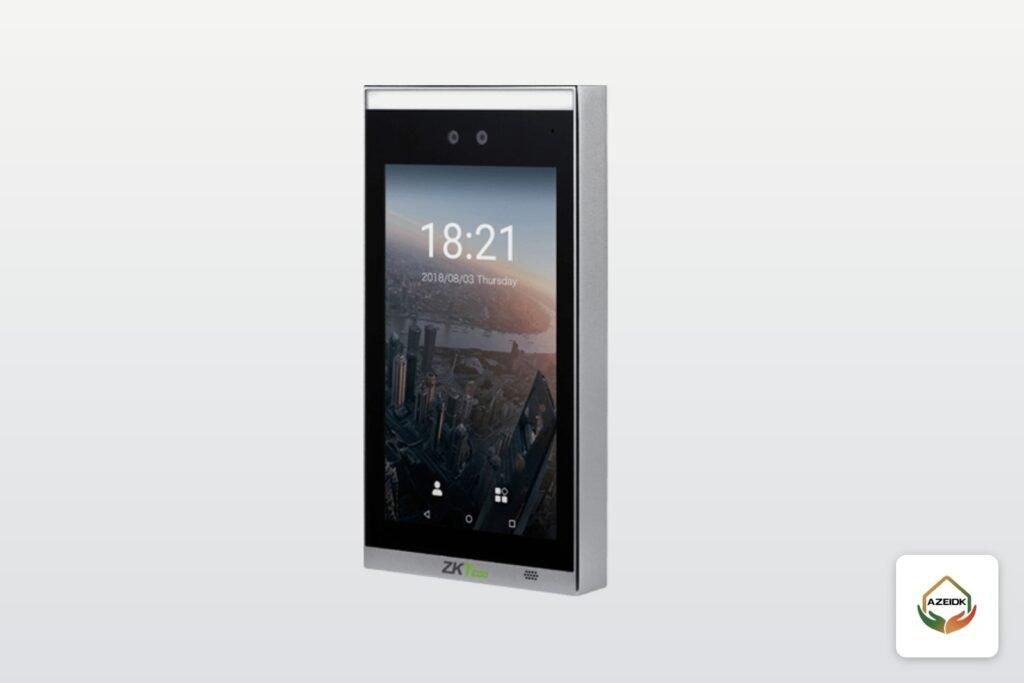
A face recognition terminal, which the Saudi market often calls “face fingerprint” (بصمة الوجه), opens a door or logs attendance as soon as an employee stands in front of it. AZEIDK supplies the ZKTeco FaceDepot-7B with a 7-inch touch screen and 10,000 face capacity, and a smaller Hikvision Value series face terminal, within its access control systems.
This guide covers the FaceDepot-7B using the figures on its product page: capacity, recognition distance and the ports for locks and sensors. It then compares it with the Hikvision unit and explains when face beats fingerprint or card. For the general comparison of verification methods, see Time Attendance Devices.
Key points
- FaceDepot-7B is an indoor terminal with a 7-inch 1280 x 720 touch screen and a 2 MP dual-lens camera, using visible-light face recognition.
- Capacity: 10,000 faces, 10,000 users and 100,000 records; fingerprint and card are optional at 10,000 each.
- Recognition distance about 0.3 to 3 m.
- Connects to locks, door sensors, exit buttons and external readers over RS485 and Wiegand, plus TCP/IP.
- The Hikvision Value series unit is smaller: 2.4-inch screen, 500 faces, with face, fingerprint, M1 card and PIN.
In this article
- How a face recognition terminal works
- ZKTeco FaceDepot-7B face recognition terminal specifications
- Connecting the terminal to the lock and door
- The Hikvision alternative: Value series
- When to choose face over fingerprint or card
- Installation tips
- Where face terminals are used
- Why the terminal fails to recognise some employees
- Frequently asked questions
How a face recognition terminal works
The terminal enrols each employee’s face once and stores it as a digital template. At the door, the camera captures the face and compares it with the stored templates; on a match it triggers the lock or logs an attendance event. Nothing needs to be touched, which helps in factories and sites where fingers get dirty or worn from manual work.
A face terminal is not the same as a face recognition camera. The terminal serves one door at short range with the person facing it; cameras cover wider areas. Cameras are covered in Face Recognition CCTV Cameras.
ZKTeco FaceDepot-7B face recognition terminal specifications
| Item | Value |
|---|---|
| Display | 7-inch touch screen, 1280 x 720 |
| Memory | 2 GB RAM, 16 GB storage |
| Camera | 2 MP dual lens |
| Face templates | 10,000 |
| Users | 10,000 |
| Records | 100,000 |
| Fingerprint / card | Optional, 10,000 each |
| Recognition distance | Approx. 0.3 to 3 m |
| Communication | TCP/IP, USB host, Wi-Fi (optional), RS232, RS485, Wiegand in/out |
| Power | 12 V, 3 A |
| Operating temperature | -10 °C to 45 °C |
| Humidity | 10% to 90% |
Figures are from the AZEIDK product page. The unit is rated for indoor use, so it should not go on an exposed outdoor gate.
Connecting the terminal to the lock and door
The terminal alone does not open a door. It needs an electric lock, and usually an exit button inside and a door sensor that reports whether the door is open. The FaceDepot-7B page lists connections to locks, door sensors, exit buttons and external readers over RS485 and Wiegand.
- Lock: a magnetic lock or an electric strike changes the wiring and how the door behaves on power loss; choose it by door type and evacuation requirements.
- External reader: over Wiegand, a card reader can be added on the other side of the door to log exits.
- Fire alarm: doors on escape routes must release automatically on alarm, per the consultant’s design and Civil Defense requirements, usually by cutting lock power through a relay from the fire alarm panel.
- Many doors: for multi-door buildings, ZKTeco InBio and C3 panels may fit better than standalone units on every door.
The Hikvision alternative: Value series
For a smaller office door or branch, AZEIDK also offers a Hikvision Value series face access and attendance terminal. Its product page lists a 2.4-inch LCD and 2 MP lens; verification by face, fingerprint, M1 card and PIN; up to 500 faces, 3,000 cards, 3,000 fingerprints and 150,000 events; face recognition under 0.2 s per user; ISAPI and ISUP 5.0; and wired network plus Wi-Fi in AP mode.
| Item | ZKTeco FaceDepot-7B | Hikvision Value series |
|---|---|---|
| Screen | 7-inch touch | 2.4-inch LCD |
| Face capacity | 10,000 | 500 |
| Fingerprint and card | Optional, 10,000 each | 3,000 fingerprints, 3,000 M1 cards |
| Records / events | 100,000 | 150,000 |
| Typical fit | Company or factory with a large workforce | Office or branch with fewer staff |
For Hikvision-based projects, Hikvision Access Control covers face terminals, the DS-K2801 controller and setup.
When to choose face over fingerprint or card
| Situation | Better choice |
|---|---|
| Workers with dirty hands or weak fingerprints | Face |
| Stopping buddy punching with cards | Face, or face plus card |
| Temporary visitors and contractors | Card or temporary code via a visitor management system |
| Server room or safe | Two-factor: face plus PIN or card |
| One door on a tight budget | A small standalone unit, see standalone door access |
Installation tips
- Mount at a height that suits average staff height, away from direct sun on the camera or behind the person.
- Enrol faces under lighting close to daily conditions.
- Provide a 12 V supply with enough capacity and battery backup for the lock power.
- Network the terminal so attendance logs reach the software; see attendance software for fingerprint devices.
- Face images are personal data: limit who can access them and review the data protection requirements that apply to your facility.
Where face terminals are used
In factories and industrial facilities, face recognition solves fingerprints that fail because of oil, cement or gloves, and shortens queues at shift change because nothing needs to be touched. In hospitals and healthcare facilities, many prefer it because there is no shared surface to touch. In offices and commercial buildings it serves the staff entrance, server rooms and archives, while cards stay for visitors. For large workforces on several shifts, see Time attendance for factories and warehouses.
Why the terminal fails to recognise some employees
Most rejections on site have practical causes that can be fixed before blaming the device:
- Lighting: strong sun through a glass door behind the person darkens the face. Move or angle the terminal.
- Enrolment: a face enrolled under different light or with sunglasses matches poorly. Re-enrol under daily conditions.
- Distance: standing outside the terminal’s stated range, about 0.3 to 3 m on the FaceDepot-7B.
- Head coverings, masks and helmets: large coverings can block a match. Allow an alternative such as card or PIN.
- Data sync: an employee added in the software but not yet pushed to the terminal. Check the network link.
Frequently asked questions
How many employees can a FaceDepot-7B face recognition terminal hold?
Up to 10,000 users and 10,000 face templates per the product page.
From what distance does it recognise a person?
About 0.3 to 3 m on the FaceDepot-7B.
Does the FaceDepot-7B read fingerprints?
Fingerprint and card are optional modules, 10,000 each when added.
Can it be installed outdoors?
The FaceDepot-7B is an indoor unit rated to 45 °C, so it does not suit an exposed gate.
Does the terminal open the door directly?
It sends the open command to a connected electric lock, and usually needs an exit button and door sensor.
ZKTeco or Hikvision here?
The FaceDepot-7B is larger, with 10,000 faces and a 7-inch screen; the Hikvision Value unit is smaller, with 500 faces.
Does it work where lighting is poor?
The FaceDepot-7B page states visible-light face recognition, so provide adequate, steady lighting at the mounting point, especially in corridors and night-time entrances.
How do attendance logs reach the computer?
With the terminal on the network over TCP/IP, the attendance software pulls the logs; the unit also has a USB host port per its product page.
Planning face-based access and attendance? Send the number of staff, doors and lock types, and the AZEIDK team will propose the right terminal and handle supply, installation and programming. Contact AZEIDK
For a site survey or quotation, see CCTV supply and installation.
Related guides
- Salamah Certificate for Hotels and Serviced Apartments: Required Systems and Steps Before Inspection
- WATEX UL-Listed Foam Bladder Tanks: Capacities, Specifications, Ratio Controllers and Sizing
- Fire Pump Faults and Troubleshooting: Failure to Start, Short Cycling, Low Pressure and Controller Alarms
- Fire Alarm in Car Workshops: When to Use Heat Detectors Instead of Smoke Detectors and Where to Place Them in Service Bays