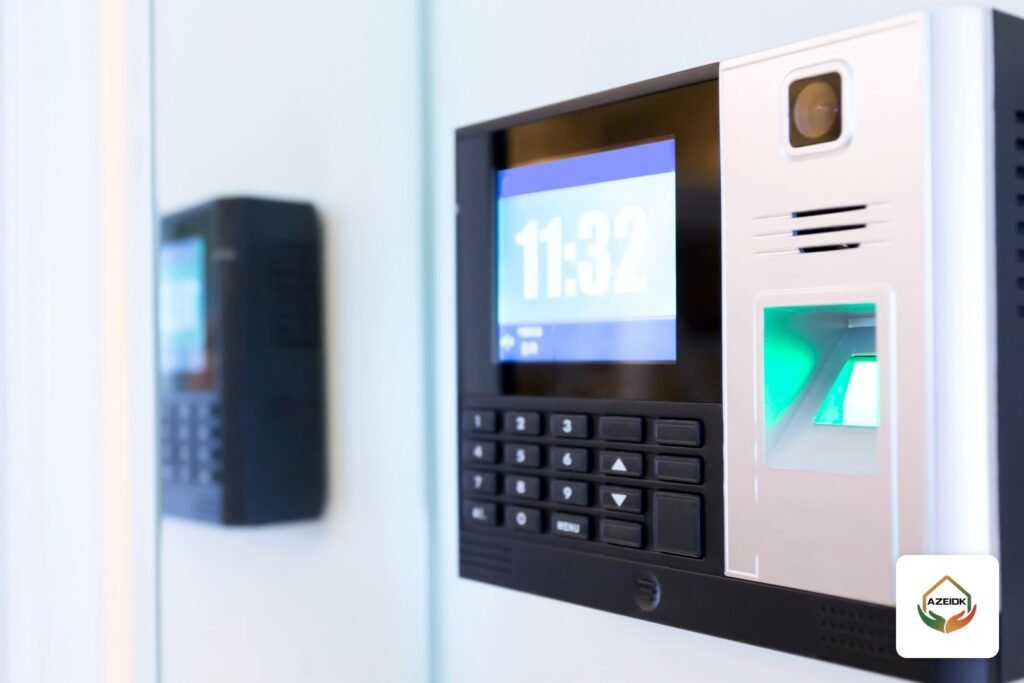
A fingerprint terminal only records when someone punched. Attendance software is what turns those punches into lateness, absence, overtime and a sheet payroll can use. Many companies buy a good device and then find the real problem is the software: shifts that will not set up, a report payroll cannot read, or no database backup.
This article covers the attendance software that works with ZKTeco and Hikvision devices, the two brands in AZEIDK’s time attendance range under security and surveillance systems: how working hours are built, which reports come out, and how the figures reach payroll. For choosing the device itself (fingerprint, face or card), see time attendance devices.
Short answer: ZKTeco offers two main programs: ZKBio Time, a web-based system installed on the company’s own server for branches and larger headcounts, and ZKBio Time.Net, a Windows desktop program for small and medium businesses. Hikvision offers the time and attendance section of iVMS-4200 for small sites and the Time and Attendance module of HikCentral Professional for large projects. All of them follow the same logic: a timetable, a shift assigned to the employee, then a report exported to payroll.
Key takeaways
- The device collects punches; the software calculates lateness, absence and overtime. Most attendance complaints come from software setup, not hardware.
- ZKBio Time runs in a browser and receives punches from ZKTeco devices over Ethernet, Wi-Fi or cellular networks. ZKTeco Europe states support for up to 500 devices.
- In Hikvision software, a shift is built from a normal or flexible timetable and assigned to people or departments for a set period.
- Attendance software does not upload salaries to Mudad. It feeds hours to the payroll system, and payroll prepares the wage file.
In this article
- What attendance software does that the device cannot
- ZKTeco software: ZKBio Time and ZKBio Time.Net
- Hikvision software: iVMS-4200 and HikCentral Professional
- The four attendance programs compared
- How to build working hours and shifts
- Reports, payroll export and Mudad
- Server, database and backup
- Common mistakes with attendance software
- Attendance system supply and installation by AZEIDK
- FAQ
- Conclusion
What attendance software does that the device cannot
A fingerprint or face terminal keeps a simple log: employee ID, date, time and verification method. It cannot say whether someone is late, because it does not know their working hours. The software does: one employee works 8 to 4, another is on a night shift past midnight, a third is on approved leave.
The software has four core jobs:
- Collecting punches: automatically over the network, or by USB flash drive from standalone devices.
- Building working hours: timetables, shifts, weekends, holidays and leave.
- Calculating: late arrival, early leave, absence, actual hours and overtime.
- Reporting and export: a monthly sheet per employee or department, and a file for payroll or HR.
ZKTeco software: ZKBio Time and ZKBio Time.Net
ZKBio Time: web-based, for branches and larger teams
ZKTeco describes ZKBio Time as browser-based attendance software that works as a private cloud: it is installed on a server the company owns, and administrators log in from anywhere through a browser. It receives punches from ZKTeco standalone devices that support push communication over Ethernet, Wi-Fi or GPRS, 3G and 4G networks. That makes it suitable for linking branches in different cities to one system.
Features listed on ZKTeco Europe’s product page include:
- Timetable, shift and schedule management, with several types of flexible scheduling.
- Attendance and overtime calculation, with automatic export of attendance reports.
- A payroll module, leave balances and multi-level approvals with email alerts.
- Employee self-service through the browser and a mobile app.
- PostgreSQL (default), SQL Server, MySQL or Oracle databases, with backup and restore.
The server runs on 64-bit Windows.
ZKBio Time.Net: desktop software for smaller sites
ZKTeco describes ZKBio Time.Net as lightweight Windows desktop attendance software for small and medium enterprises. It connects to ZKTeco devices over Ethernet, Wi-Fi or USB, calculates attendance, produces more than 15 report types and includes a payroll module.
Not every ZKTeco device works with every program. The ZKTeco UA400, for example, works with ZKBio Time.Net and ZKBio Time, while other models list different software in their datasheets. Ask the supplier for the supported software of the exact model before buying. More in ZKTeco in Saudi Arabia.
Hikvision software: iVMS-4200 and HikCentral Professional
iVMS-4200: attendance inside the client software
iVMS-4200, widely used for cameras, also has a Time and Attendance section. Hikvision support explains that setup starts by adding the access control device and the persons, then creating a timetable, which can be switched to the flexible type, then assigning a shift schedule to each person with an expiry date. By default the software calculates attendance at 1:00 AM, and it can be recalculated manually for everyone or for one employee.
HikCentral Professional: a platform for large projects
Time and Attendance is one of HikCentral Professional’s main modules. The datasheet lists flexible attendance rules, varied reports with customizable templates, employees checking their results and submitting correction requests, and easy integration with third-party payroll systems. The platform manual explains that shifts can repeat daily, weekly or monthly, and that attendance rules can be set globally, per department or per attendance group. Hikvision support describes two shift templates: a normal shift with defined check-in and check-out windows, and a more flexible man-hour shift.
For a small office, the Hikvision DS-K1A8503EF runs standalone and exports attendance reports to a USB drive, so no software is needed at the start.
The four attendance programs compared
| Software | Devices | How it runs | Best for | Payroll |
|---|---|---|---|---|
| ZKBio Time | ZKTeco push devices | Web, on an in-house server, browser access | Multiple branches, large headcounts, up to 500 devices | Payroll module, automatic export, API |
| ZKBio Time.Net | Supported ZKTeco devices | Windows desktop | Small or medium business on one site | Payroll calculation module |
| iVMS-4200 | Hikvision access control devices | Windows client | Small site managing cameras and attendance together | Attendance reports; check export by version |
| HikCentral Professional | Hikvision devices | Central platform with web client | Large projects, compounds, multi-system facilities | Integration with third-party payroll |
Each brand’s software is built for its own devices. We found nothing in either manufacturer’s documentation showing one brand’s software managing the other’s devices, so do not mix them on one site without written confirmation from the supplier.
How to build working hours and shifts
All four programs follow roughly the same logic, whatever the menu names:
- Timetable: start and end time, grace period for lateness and any break. Use normal for fixed hours and flexible for hour-based work.
- Shift: groups one or more timetables, sets the repeat pattern and the days off.
- Schedule: assigns the shift to an employee or department for a period, with temporary schedules when needed.
- Rules: when absence is counted, how overtime is calculated, and which punch counts when someone punches twice.
In Saudi Arabia these settings sit under the Labor Law. As published by the Ministry of Human Resources and Social Development, Article 98 limits actual work to 8 hours a day under a daily standard or 48 hours a week under a weekly standard, reduced for Muslim workers in Ramadan to 6 hours a day or 36 a week. Article 107 sets overtime pay at the hourly wage plus 50% of the basic wage. Prepare the Ramadan timetable in advance and set the overtime rule to match company policy and the law.
Night shifts that cross midnight are a common source of errors, so test one employee before rolling the shift out.
Reports, payroll export and Mudad
The most used reports are the daily sheet, a monthly summary per employee (days present and absent, minutes late, overtime) and an exceptions report (missing check-in or check-out). In HikCentral Professional, export is done from the attendance report menu: choose the report type, attendance group, period and file format, and the file is saved to your PC.
There are three common ways to connect to payroll:
- Built-in payroll module: in ZKBio Time and ZKBio Time.Net, for companies with no separate payroll system.
- File export: the most common route. Columns and employee IDs must match what payroll expects.
- API: available in ZKBio Time; Hikvision states HikCentral integrates with third-party payroll. A developer on the payroll side is needed.
Mudad is the official portal of the Wage Protection Program launched by the Ministry of Human Resources and Social Development, letting companies prove wages were paid. Attendance software does not deal with it directly: it feeds hours and deductions to payroll, and the payroll system or accountant prepares and uploads the file.
Server, database and backup
Attendance records are a financial document; losing them means salary disputes. Before go-live, decide:
- Where the server runs: a dedicated machine in the network room, not a staff PC switched off after hours.
- The database backup schedule, with a copy kept off the server.
- Permissions: who edits punches, approves requests and exports payroll.
Download the software only from the manufacturer or its authorized distributor.
Common mistakes with attendance software
- Device IDs that differ from payroll IDs, so matching fails at month end.
- Unsynchronized device clocks, so punches land on the wrong day.
- Forgetting the Ramadan timetable or public holidays.
- Testing the export on dummy data instead of a real month with absences, overtime and leave.
Attendance system supply and installation by AZEIDK
AZEIDK supplies ZKTeco and Hikvision attendance devices within its time attendance systems, helps match the device to the right software for the headcount and number of branches, and installs the devices on the network. If a device fails or punches stop reaching the software, that falls under corrective maintenance and technical support. AZEIDK holds ISO 9001, ISO 14001 and ISO 45001 certificates, with a scope that covers design, supply, installation and maintenance of CCTV and access control systems.
If the device will also open a door, compare verification methods in access control technologies.
FAQ
What is the best attendance software for ZKTeco devices?
For several branches and larger headcounts, ZKBio Time, because it runs in a browser and receives punches over the network. For one small site, ZKBio Time.Net on a Windows PC is usually enough.
Can a fingerprint device be linked to payroll and Mudad?
The device feeds the attendance software, which exports hours and deductions to payroll by file or API. The payroll file goes to Mudad from the payroll system, not from the device.
Is a time attendance system mandatory in Saudi Arabia?
The working-hours articles published by the Ministry of Human Resources set maximum hours and overtime pay, and we found no text in them requiring a specific device or software. Calculating overtime accurately does need a reliable attendance record.
Does attendance software work without internet?
Yes, within the company network, because ZKBio Time, ZKBio Time.Net and iVMS-4200 are installed on in-house machines. Internet is only needed to connect remote branches or to log in from outside.
Can devices at several branches use one program?
Yes. ZKTeco push devices send punches to ZKBio Time over Ethernet, Wi-Fi or cellular networks, and on the Hikvision side HikCentral Professional brings devices, persons and attendance reports into one central platform.
How much does attendance software cost?
Cost depends on the program, the license type, the number of devices and employees, add-on modules such as payroll or visitors, and the server, installation and training.
Does face, fingerprint or card make a difference in the software?
The software treats a punch the same way whatever the method and only records which one was used. The difference is in the device: a card can be handed to someone else, while face and fingerprint are tied to the employee.
Conclusion
Choosing attendance software starts with the number of sites, the headcount and the existing payroll system; then pick a device the software supports, not the reverse. Build shifts, the Ramadan timetable and overtime rules before go-live, test the export on a real month, and keep a backup off the server.
Setting up attendance for one site or several branches? Send us your headcount, branches, working pattern and payroll system, and we will propose compatible devices and software. Contact the AZEIDK team
Related guides
- OS&Y Gate Valves and Ball Valves for Fire Systems: United Brass Works and Apollo in Saudi Arabia
- CCTV Software for PC: Hikvision iVMS-4200 and Dahua SmartPSS, Adding Devices, Recording and Export
- Fire Sprinkler Hydrostatic Testing Before Handover: Pressure, Duration and Records
- Meter-Based Maintenance: AZEIDK’s New Pricing System