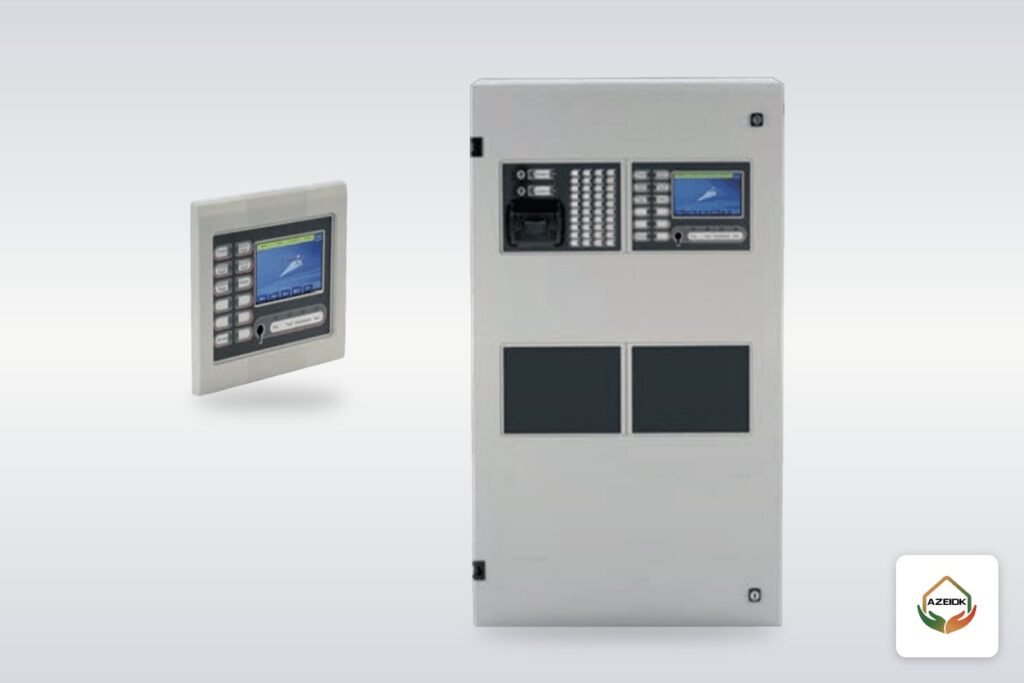
The ZFP fire alarm panel from Context Plus is an addressable panel with a full-colour touchscreen, available from 1 to 8 loops in three cabinet sizes. The versions AZEIDK lists carry 40 zonal LEDs, with an optional onboard event printer. It suits medium and large buildings that need panel networking and extensive interfacing with building systems. The models are on the ZFP Panel with 40 Zonal LEDs page, part of AZEIDK’s fire alarm systems.
For how conventional and addressable systems compare, see our guide to choosing a fire alarm system for Saudi projects.
This guide brings together what the product pages and the XFP/ZFP catalogue published on the AZEIDK site say about capacity, cabinets, batteries, networking and expansion cards. It then compares ZFP with the XFP and FirePlus panels from the same brand and sets out a selection sequence and the mistakes that recur on Saudi projects.
Key points
- ZFP is an addressable panel from 1 to 8 loops using the XP95 and Discovery protocols, compatible with Context Plus detectors, call points, sounders and control modules.
- Three cabinet sizes: standard (1, 2 or 4 loops), medium and large (2, 4, 6 or 8 loops).
- Batteries up to 2 x 12 V 18 Ah in the standard cabinet and up to 38 Ah in medium and large cabinets, per the catalogue.
- Fault-tolerant RS485 ring network of up to 128 nodes (64 panels and 64 compact controllers or repeaters); each networked panel needs a ZHN card.
- The catalogue states third-party certification to EN 54 parts 2 and 4 by Intertek; the approval required on each project is checked against the datasheet.
In this article
- What is the ZFP fire alarm panel and who is it for?
- ZFP specifications from the Context Plus catalogue
- Standard or medium cabinet, and when to choose the onboard printer
- Expansion cards, repeaters and graphic interfaces
- ZFP, XFP or FirePlus: which Context Plus addressable panel fits?
- Selecting a ZFP panel for a Saudi project
- Common mistakes with ZFP supply and installation
- ZFP panels from AZEIDK
- FAQ
- Summary
What is the ZFP fire alarm panel and who is it for?
ZFP is the larger Context Plus addressable family, above the one and two loop XFP range. The most visible difference is the interface: a Z41 control module with a 4.3 inch full-colour touchscreen and on-screen keyboard, instead of the text display and keys of smaller panels. The screen can carry the owner’s logo.
The product page lists commercial and office buildings, healthcare, education, hotels, malls, factories and large facilities. In practice the deciding factors are the device and loop count, whether panels must be networked across buildings or towers, and how many control outputs the cause and effect matrix calls for.
In Saudi Arabia, Section 907 of the Saudi Fire Code SBC 801 sets fire alarm and detection requirements by occupancy, and NFPA 72 is used as the technical reference adopted by the designer. The panel implements the approved design; it does not replace it.
ZFP specifications from the Context Plus catalogue
The values below are taken from the specification table in the XFP/ZFP catalogue on the AZEIDK site. Check them against the datasheet of the exact model quoted before approval.
| Item | Catalogue value |
|---|---|
| Loops | 1, 2, 4, 6 or 8 depending on model |
| Protocol and loop capacity | Context Plus XP95, up to 127 addressable devices per loop |
| Loop current | 500 mA maximum per loop (25 to 34 V) |
| Loop cable | Fire-resistant screened, up to 2.5 mm², 1 km maximum per loop |
| Loop impedance | 20 ohm maximum per conductor |
| Internal power supply | 5 A, mains 230 V AC ±10% |
| Batteries | 2 x 12 V 18 Ah (standard), 2 x 12 V 38 Ah (medium and large) |
| Conventional sounder circuits | Two 1 A outputs, 19.5 to 28 V |
| Onboard I/O | Two programmable inputs, two programmable relays rated 1 A at 30 V, one fault relay, one 24 V auxiliary output of 100 mA |
| Zonal indication | Up to 200 LEDs per panel (100 on standard cabinets) and 10,000 programmable detection zones |
| Device text | Up to 38 characters per loop device |
| Event log | 20,000+ events, filterable by fire, fault and date |
| Environment | -5 to +40 °C, 5% to 95% RH non-condensing |
The catalogue also lists a galvanically isolated USB port for PC programming, a 4 GB Micro SD card for off-site configuration, four programmable operating modes and engineering tools such as SafeMode and DeviceManager.
Standard or medium cabinet, and when to choose the onboard printer
Cabinet size follows two things: the number of loops and the battery capacity from the standby calculation. AZEIDK lists four options with 40 zonal LEDs:
| Option | Loops | Catalogue part numbers | Typical fit |
|---|---|---|---|
| Standard cabinet, no printer | 1, 2 or 4 | Z015040NS, Z025040NS, Z045040NS | Mid-size building with batteries up to 18 Ah |
| Standard cabinet with printer | 2 or 4 | Z025040PS, Z045040PS | Sites wanting a printed event record in the control room |
| Medium cabinet, no printer | 6 or 8 | Z065040NM, Z085040NM | Large buildings with more loops and larger batteries |
| Medium cabinet with printer | 6 or 8 | Z065040PM, Z085040PM | Hospitals, hotels and complexes that rely on printed records |
The ZFP panel with onboard printer page notes that printed events help operation and maintenance teams with follow-up, inspection and documentation. It does not replace the electronic event log or the fire alarm log book kept for inspections.
The catalogue quotes 72 hours standby plus 30 minutes alarm for standard cabinets. That is a manufacturer example: battery capacity on your project is calculated from real loads and the duration set by the approved design, as in our fire alarm battery calculation guide.
Expansion cards, repeaters and graphic interfaces
ZFP expands over an internal A-Bus that accepts up to 15 cards per the catalogue. The ZFP repeaters, expansion PCBs and graphic interfaces product groups these accessories:
- ZHN network card: one RS485 card per networked main panel.
- Z02LOOP loop extender: extends a two loop panel to four loops.
- Relay cards: Z11 with four relays (half size) and Z12 with eight relays (full size), including the ZFP 4 relay PCB for interfaces with HVAC, access control and other systems.
- I/O cards: Z13 with eight and Z14 with sixteen.
- Sounder and conventional zone cards: Z15 with four 1 A sounder circuits, Z16 with four detection zones and two sounder circuits.
- ZREP1S repeater: a surface-mounted repeater or compact controller that needs a BF360-24 1 A 24 V boxed PSU.
- ZTOOLS programming software and graphics packages ZG1 to ZG4, covering one panel up to 99 panels, some with TCP/IP remote access.
Every added card enters the power and battery calculation, and the number of relays comes from the cause and effect matrix, not from guesswork. Review the cause and effect matrix guide first.
ZFP, XFP or FirePlus: which Context Plus addressable panel fits?
AZEIDK supplies three Context Plus addressable families. The table summarises the differences stated on the product pages and catalogue:
| Item | XFP | FirePlus | ZFP |
|---|---|---|---|
| Loops | 1 or 2 | 1 to 6 | 1 to 8 |
| Interface | Backlit display and keypad | Panel display and front controls | 4.3 inch colour touchscreen |
| Zonal LEDs | 16 or 32 | 32, expandable to 64 | 40 on listed models, up to 200 with modules |
| Network | Up to 8 main panels on RS485 | Networkable | Up to 128 nodes on an RS485 ring |
| Max battery | 3.2 or 7 Ah | 24 Ah | 18 or 38 Ah |
| Typical use | Small to mid-size buildings | Mid-size to large buildings | Large buildings, complexes and panel networks |
For FirePlus details see the FirePlus addressable panels page. For the wider addressable versus conventional decision see how to choose a fire alarm control panel.
Selecting a ZFP panel for a Saudi project
- Count devices per loop: detectors, call points, loop-powered sounders and I/O units, with spare capacity. The catalogue allows 127 devices, but the design must respect loop current, voltage drop and cable length.
- Place isolators: the Context Plus catalogue recommends isolators at intervals of no more than 20 devices and at fire compartment boundaries. See addressable loop design.
- Fix loops and cabinet: 1 to 4 loops in the standard cabinet, 6 or 8 in medium or large.
- Calculate batteries: above 18 Ah, move to the medium cabinet.
- List control outputs: lifts, air handling units, smoke fans and doors, then choose relay and I/O cards or loop modules.
- Decide on networking and repeaters: for several buildings or a security room display, add a ZHN card per panel and the repeaters needed.
- Confirm the approval required: EN 54 or UL listing. Do not mix devices from different approval systems on one loop, as our UL vs EN 54 guide explains.
Common mistakes with ZFP supply and installation
- Choosing the standard cabinet, then finding the battery calculation exceeds 18 Ah.
- Buying networked panels without a ZHN card for each, or running network cable that is not fire resistant.
- Estimating relays before the cause and effect matrix is approved, then adding cards after installation.
- Installing the panel in a hot electrical room when the catalogue range ends at 40 °C.
- Leaving device text blank or cryptic, although the panel allows 38 characters to describe each location.
ZFP panels from AZEIDK
AZEIDK is the Context Plus agent in Saudi Arabia and supplies ZFP panels, cards and accessories with compatible devices from the same brand. Support covers model selection, submittals, supply, design, installation, programming and systems integration, testing and commissioning, and maintenance contracts. The rest of the range is on the Context Plus brand page.
FAQ
How many loops does the ZFP fire alarm panel support?
From 1 to 8 loops depending on model. Standard cabinets take up to 4 loops; medium and large cabinets up to 8.
How many devices can one ZFP loop carry?
The catalogue specification table gives up to 127 addressable XP95 devices per loop with a 500 mA maximum loop current. The real number comes from the current and voltage drop calculation.
Does ZFP work with detectors from other brands?
The catalogue states compatibility with Context Plus XP95 and Discovery devices. Any other device needs written compatibility confirmation from the manufacturer before approval.
What is the onboard printer for?
Printing system events for operation and maintenance teams. It is optional and available on 2, 4, 6 and 8 loop models.
How many panels can be networked?
Up to 128 nodes per the catalogue: 64 panels and 64 compact controllers or repeaters, with up to 1 km between nodes.
How does ZFP differ from XFP?
XFP has one or two loops and a text display. ZFP has 1 to 8 loops, a touchscreen, a larger network and more expansion cards, so it suits bigger projects.
Summary
ZFP is the Context Plus choice once a project outgrows small panels: more loops, a wider network, expandable zonal indication and control outputs, and a touchscreen that simplifies operation. The right configuration still comes from the device count, the battery calculation and the cause and effect matrix, not from loop count alone.
Related reading: Wedding Hall Fire Alarm System, Fire Alarm Systems in Buraydah and Qassim and FG Fire Alarm in Saudi Arabia.
Reviewing a quotation for an addressable panel? Send us device counts, drawings and interface requirements, and our technical selection team will define the right ZFP model and cards with datasheets. Contact the AZEIDK team