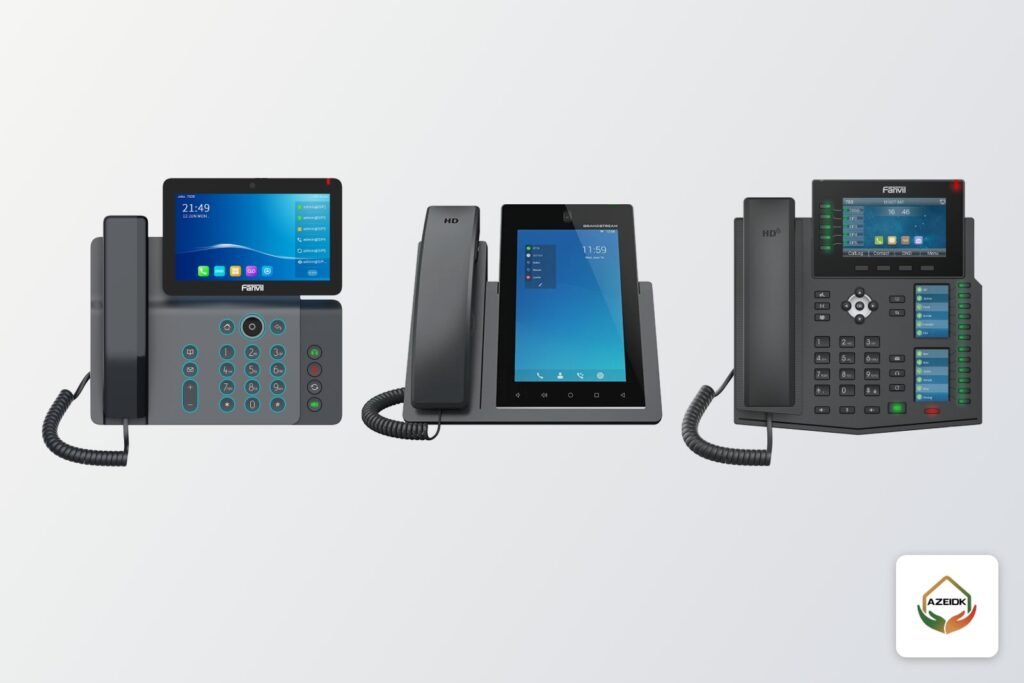
A video desk phone puts a touch screen and a camera on the manager’s desk, the premium reception counter or the security room, where a normal IP phone is not enough. It can take face-to-face calls between branches, show the video from a SIP door station and run apps. This guide compares the video and touch-screen desk phones listed on the AZEIDK website: Avaya Vantage K155 and K175, Fanvil V67, Grandstream GXV3470, the Cisco Desk Phone 9800 series and the Fanvil X6U executive phone. Every figure comes from the product pages and official datasheets.
AZEIDK supplies, installs and programs these phones within its network and communication systems. For ordinary desks see choosing an IP phone for the office.
Quick answer
- The PBX comes first: Avaya Vantage works with Avaya IP Office and Avaya Aura; Fanvil and Grandstream are SIP phones for SIP PBXs such as Yeastar or Grandstream UCM; the Cisco 9800 registers on Webex Calling, Cisco Unified CM and other SIP platforms.
- Large screen and video for a manager: Fanvil V67 (7 in) or Grandstream GXV3470 (7 in), or Avaya K175 (8 in) on an Avaya PBX.
- Small video device on a compact desk: Avaya Vantage K155 (5 in).
- Many lines without video, for a receptionist or executive assistant: Fanvil X6U with 20 SIP lines and two DSS screens.
The models compared
| Model | Screen | Camera | Lines / platform | Network |
|---|---|---|---|---|
| Avaya Vantage K155 | 5 in touch, 720 x 1280 | 2 MP, 1080p30 | Avaya IP Office and Aura, Android 12 GO | Dual gigabit, Wi-Fi ac, Bluetooth 4.2, PoE |
| Avaya Vantage K175 | 8 in portrait touch, 1280 x 800 | With or without 2 MP camera | Avaya IP Office and Aura, Android 12 GO | Dual gigabit, Wi-Fi ac, Bluetooth 4.2, PoE, 4 microphones |
| Fanvil V67 | 7 in touch, 1024 x 600 | 5 MP 1080p with privacy cover | 20 SIP lines, Android 9.0 | Dual gigabit, PoE, dual-band Wi-Fi, Bluetooth 4.2 |
| Grandstream GXV3470 | 7 in touch, 800 x 1280 | Tiltable 2 MP with privacy shutter | 16 SIP accounts, Android 14 | Dual gigabit, PoE/PoE+, Wi-Fi 6, Bluetooth 5.0 |
| Cisco Desk Phone 9800 | From 3.5 in grey (9841) to 5 in colour touch (9871) | Not stated on the page | Webex Calling, Cisco Unified CM, BroadWorks, Asterisk and others | Gigabit PC port, PoE; Wi-Fi and Bluetooth on 9861 and 9871 |
| Fanvil X6U | 4.3 in colour plus two 2.4 in DSS screens | None | 20 SIP lines, up to 60 DSS keys over 5 pages | Gigabit, PoE, built-in Bluetooth |
Choosing by position
- Manager’s office: video calls with branches and a large screen for apps. The GXV3470 lists 3-way 720p video conferencing and 10-way audio conferencing; the V67 lists video calls up to 1080p in H.264. On an Avaya site the K175 adds an 8 in screen and four microphones.
- Premium reception and security room: the Fanvil V67 and Grandstream GXV3470 product pages list viewing video from SIP door phones, which pairs well with the door stations in Fanvil i64 or Grandstream GDS3710.
- Executive assistant or switchboard: many lines and busy-lamp keys matter more than video, so the Fanvil X6U or the Cisco 9871 with 128 programmable keys.
- Webex users: the Cisco 9800 series registers on Webex Calling, which suits hybrid offices already on Webex.
Standard desks in the same office can use cheaper models from the same brand so that one PBX manages all phones: Fanvil X303 and X4U, or Grandstream GRP2614 and GRP2670.
What to check before ordering
- That the PBX supports video calls and the phone model; with Avaya, the IP Office or Aura release, see Avaya IP Office PBX.
- The PoE class on the switch port: the GXV3470 and K-series pages list PoE Class 3 or Class 4.
- Network quality for video between branches, with a separate voice VLAN, see ELV network VLAN design.
- A privacy cover or shutter where cameras face the user, available on the V67 and GXV3470.
Frequently asked questions
Does the Avaya Vantage work with a Yeastar or Grandstream PBX?
The product pages list Avaya IP Office and Avaya Aura as the supported platforms, so Vantage belongs on Avaya systems. For other SIP PBXs the Fanvil V67 or Grandstream GXV3470 are the listed choices.
Can a video phone open the door from the door station?
The V67 and GXV3470 pages list showing video from door phones. Opening the lock depends on the door station and PBX setup, so it is tested during commissioning.
Is Wi-Fi enough, or do I need a cable?
All the models have gigabit Ethernet with PoE. Wi-Fi is available on several of them, but a cable gives more stable video, so the cable is the safer choice where a data point exists.
How many video phones does an office need?
Usually only for managers, the premium reception and the security room, with standard IP phones on the other desks.
Upgrading the phones for your managers or reception? The AZEIDK team matches the phone to your PBX, network and door stations. Request a quote
Related guides
- UTEPO PoE Switch and UTP7301EPoC Coax Ethernet Extender for CCTV in Saudi Arabia
- CCTV Cameras for Restaurants and Cafes: Cashier, Dining, Kitchen, Store and the Law
- FIRETECH F226 Foam Spray Nozzle: K-43 vs K-79, Pressure, Spacing and Where It Is Used
- SASO Technical Regulation for Fire-Fighting Equipment: Scope, Standards and Supplier Duties