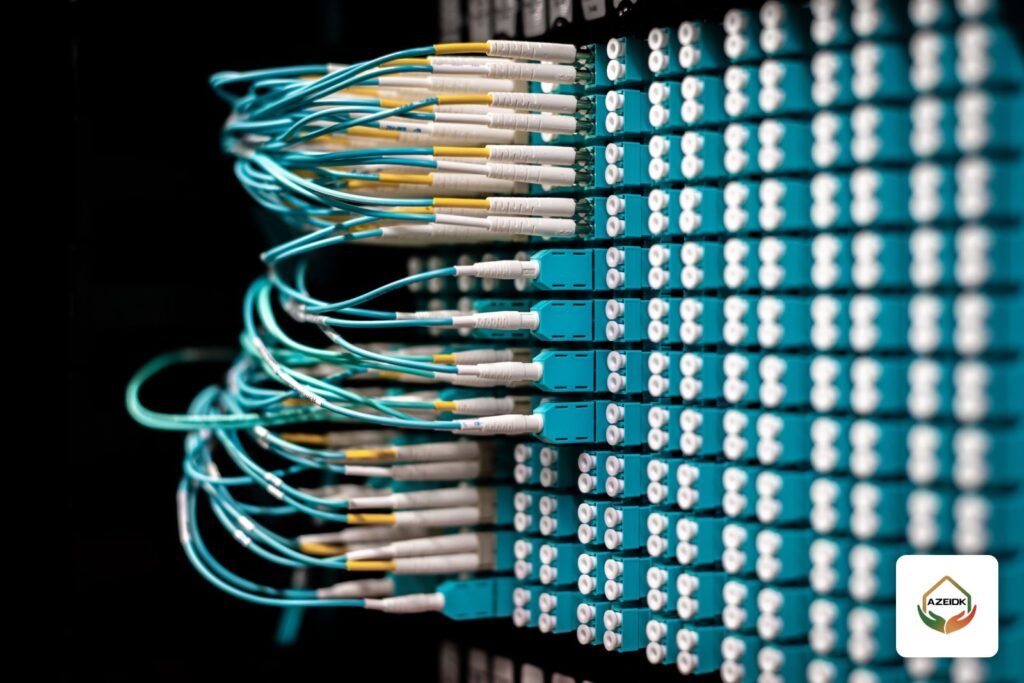
A patch cord is the short, ready-made cable that connects a patch panel port to a switch in the rack, or a wall outlet to a computer, phone or camera. It looks minor, but it is the last link in the channel: a lower category or damaged cord drags the whole link down, however good the cable in the walls.
AZEIDK supplies Cat6 and Cat6A copper patch cords and fibre patch cords as part of its network and communication systems, including AZ Link Cat6 UTP patch cords in short rack lengths, alongside patch panels, cable and cabinets.
Key points
- The patch cord category should match or exceed the link: a Cat6A link needs Cat6A cords.
- A standard copper channel is 100 m: about 90 m of fixed cable plus patch cords at both ends.
- Fibre patch cords are chosen by fibre type (single-mode or multimode) and the connector at each end.
- Fibre jacket colours mean something: yellow for single-mode, aqua for OM3 and OM4 multimode.
- Replace a cord when the connector or latch is damaged or the port keeps logging errors.
Copper patch cords: Cat6 and Cat6A
A copper patch cord is flexible stranded cable with factory-fitted RJ45 plugs, better suited to bending and repeated plugging than the solid cable run in walls. The key rule: do not mix categories. If the horizontal cable, jacks and patch panel are Cat6A, such as the Legrand LCS3 panel, a Cat6 cord reduces the link to Cat6 performance.
See Cat6 vs Cat6A cable and network cable types.
Lengths: why not use long patch cords?
A copper channel is limited to 100 m, typically 90 m of permanent link with about 5 m of patch cord at each end. Choose cord length to suit the real distance: very short cords between patch panel and switch in the rack, and just enough at the desk to reach the outlet without coils. Excess length fills the rack, blocks airflow and makes ports hard to trace.
Colours: organising the rack
Copper patch cord colours are not a mandatory standard but an organising tool. Many sites assign a colour per use, for example one for desk points and another for cameras or Wi-Fi. Record the scheme in the handover documents so maintenance teams follow it.
In fibre, colour has technical meaning. According to the Fiber Optic Association and TIA-598, yellow jackets are single-mode, orange is OM1 and OM2 multimode, and aqua is OM3 and OM4. Connector colour helps too: blue for standard single-mode, green for APC.
Fibre patch cords: what to specify
- Fibre type: single-mode or multimode, matching the installed fibre.
- Connector at each end: such as LC or SC; the two ends may differ to suit the switch port and fibre drawer.
- Duplex or simplex: most links use duplex cords for transmit and receive.
- Length: to suit the distance within or between racks.
Fibre cords usually run from a fibre drawer to the switch’s fibre module. For Corning fibre, see Corning fibre optic cabling.
When to replace a patch cord
- The RJ45 latch is broken and the plug slips out.
- The jacket is cut or crushed under a rack door or desk leg.
- The port shows errors or drops when the cable is touched.
- A fibre connector is dirty or scratched; clean it with proper tools or replace it.
- The cord category is below the link after a network upgrade.
A tidy rack from day one prevents most of these. See the patch panel guide.
Frequently asked questions
What is a patch cord?
A short ready-made network cable with plugs at both ends, linking a patch panel to a switch or a wall outlet to a device.
Can I use a Cat6 patch cord on a Cat6A network?
It is not recommended: a link performs at its lowest category. Use Cat6A at both ends.
How long can patch cords be?
In a typical copper channel, patch cords total about 10 m across both ends, with 90 m of fixed cable.
What does a fibre patch cord colour mean?
Yellow is single-mode, aqua is OM3 and OM4 multimode, orange is OM1 and OM2.
Is a patch cord different from normal cable?
Yes. Patch cords are flexible with factory plugs for repeated connection; solid cable is run in walls and terminated on jacks or panels.
Building or upgrading a network rack? Send us the port count and network category, and AZEIDK will specify the patch cords and panels. Contact AZEIDK
Related guides
- Fire Doors in Riyadh: Supply and Installation of Fire Rated Doors for Towers, Warehouses and Hospitals
- Fire Sprinkler Pipe Corrosion and MIC: Causes, Warning Signs, Internal Inspection and Treatment
- Small Fire Extinguisher, 1 kg and 2 kg: Where It Fits and When It Is Not Enough
- Fire Pipe Price in Saudi Arabia: What Drives the Cost (Schedule 40 vs 10, UL/FM, Grooved vs Threaded, Size)