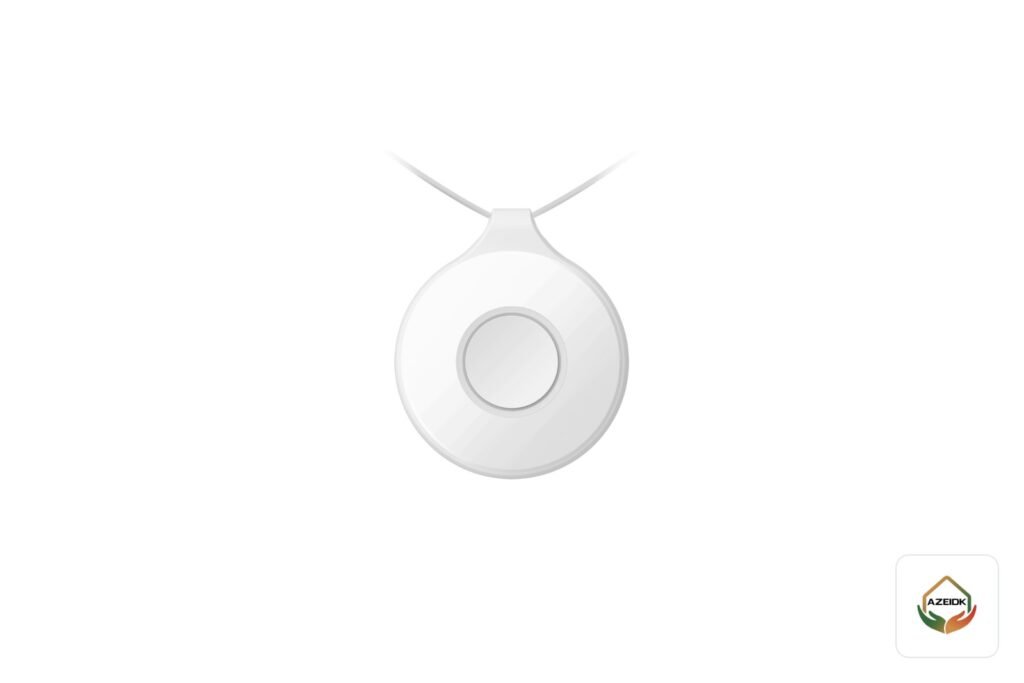
A panic button (emergency button) is pressed by a staff member or resident facing a threat, assault or medical emergency, and the alert goes straight to the alarm system, the security room or a phone, with no call or explanation needed. AZEIDK supplies two different types: the Hikvision DS-PDEBP1-EG2-WE wireless panic pendant within its intrusion alarm systems, and the ZYCOO PB-S11 network panic button for IP communication systems.
The difference is not only the form factor but where the alert goes. This guide explains how each type works, its specifications from the product page, where to install it in shops, clinics, schools and offices, and how to avoid accidental presses.
Key points
- The Hikvision DS-PDEBP1 is a 38 × 12 mm wireless pendant that pairs with the AX PRO alarm panel and raises an alarm through it.
- The ZYCOO PB-S11 is a wall-mounted SIP button that places an emergency call or sends an alert to the IP PBX or audio server.
- The Hikvision button runs on one battery for up to 3 years standby; ZYCOO is powered by PoE from the network switch.
- The ZYCOO button has a microphone and a dry-contact output to drive a strobe or siren.
- Choose by who receives the alert: the alarm system and its app, or security and reception staff by phone.
In this article
- What is a panic button and how does it work?
- Hikvision DS-PDEBP1-EG2-WE wireless panic button
- ZYCOO PB-S11 network panic button
- Hikvision vs ZYCOO panic button
- Linking a panic button to a strobe or external device
- Panic buttons and CCTV
- Where to install a panic button
- Avoiding false presses and keeping buttons working
- FAQ
What is a panic button and how does it work?
A panic button is the manual input in a security system. Detectors catch events on their own; the button relies on a person who sees the danger: a cashier being threatened, a clinic receptionist facing an aggressive visitor, or an elderly person who has fallen at home. One press sends the alert without anyone noticing.
- Alarm-system button: sends a wireless signal to the alarm panel, which acts as programmed: sound the siren, or send a silent alert to the app and the monitoring company.
- SIP network button: connected to the building network and IP phone system, it calls a set number such as security or reception, or alerts the PBX, and can drive a local strobe or siren.
Hikvision DS-PDEBP1-EG2-WE wireless panic button
A one-button portable panic pendant for Hikvision’s AX PRO system, small enough for a key ring, with an optional wristband or lanyard. Data from AZEIDK’s product page:
- Radio: Tri-X two-way wireless at 868 MHz with secured transmission (a 433 MHz version, DS-PDEBP1-EG2-WB, is also available).
- Open-air range: 1 km.
- Battery: one battery, up to 3 years standby.
- Operating temperature: -10 to 55 °C.
- Size and weight: φ38 × 12 mm, 13.5 g.
Being wireless and portable, it suits people who move around: a guard patrolling a warehouse, a shop owner moving between the floor and the store, or someone who needs the button on them at home. It works only with an AX PRO panel on a matching frequency.
ZYCOO PB-S11 network panic button
The PB-S11 is a fixed button for a wall or under a desk, using SIP. When pressed it places an emergency call or sends an alert to the PBX or IP audio server, and its microphone carries sound from the button location to whoever takes the call. Product page data:
- Power: PoE (IEEE 802.3af/at), no separate adapter.
- Network: 10/100 Mbps Ethernet.
- Audio codecs: G.722, G.711 A-law and U-law, Opus; microphone sensitivity -36±3 dB.
- Dry-contact output on a 2-pin Phoenix connector to drive an external device such as a strobe or siren.
- Size: 114 × 70 × 40 mm; weight 208 g.
It suits sites with an IP PBX or networked intercom and paging, such as hospitals, schools, hotels and offices. See our article on ZYCOO in Saudi Arabia.
Hikvision vs ZYCOO panic button
| Item | Hikvision DS-PDEBP1-EG2-WE | ZYCOO PB-S11 |
|---|---|---|
| Type | Wireless, portable | Fixed, SIP network |
| Connects to | AX PRO alarm panel | IP PBX or SIP audio server |
| Alert | Alarm via the panel and its app | Emergency call or alert, with microphone |
| Power | Battery | PoE |
| External device | Via panel programming and accessories | Direct dry-contact output |
| Cable needed | No | Yes, network cable |
Linking a panic button to a strobe or external device
Some sites need more than a phone alert: a strobe over the door, a bell in the security room or a light that switches on when the button is pressed. How it is done depends on the type:
- ZYCOO PB-S11: the button’s own dry-contact output drives the external device directly, through a relay rated for the load.
- Hikvision AX PRO: add a wireless output module such as the DS-PM1-O1H-WE. Its page lists one relay output up to 13 A at 100 to 240 VAC, triggering by alarm, schedule, fault or manual scenarios, and 868 MHz wireless.
Mind the frequency: wireless devices in one system must match the panel’s frequency, and AX PRO devices come in two versions, 868 MHz (WE) and 433 MHz (WB); the two models above are the WE versions at 868 MHz. AZEIDK supplies both versions, so check the full model code of the panel and every accessory before ordering.
Panic buttons and CCTV
The panic button tells you something is wrong; the camera records what happened. Plan them together: a camera covering the cashier or reception area from an angle that shows the face, the staff member’s hand and the counter, with recordings kept long enough. When an alert arrives, security can go to the recording at that exact time, which makes it easy to find the clip and hand it to the authorities on request.
Where to install a panic button
- Cashier and point of sale: under the counter, within reach but out of sight of the customer. Common in jewellery shops, as covered in CCTV for gold and jewellery shops.
- Clinic and office reception: a fixed button linked to security or the manager.
- Patients and the elderly: a pendant or wristband to call for help anywhere in the home.
- Warehouses and remote sites: a portable button carried by the guard on patrol.
- School corridors and classrooms: a network button linked to the administration.
Avoiding false presses and keeping buttons working
Two things ruin a panic button: accidental presses that teach staff to ignore alerts, and a button never tested since installation. So:
- Place fixed buttons where knees and bags cannot press them.
- Agree the response: who receives the alert, who calls back, and when the authorities are informed.
- Set in the alarm panel whether the alert is silent or audible. Silent suits robbery; a siren suits calls for help.
- Test each button regularly and watch low-battery warnings on wireless buttons.
For the button’s place in the full system, see intrusion alarm systems: components, design and integration.
FAQ
What is a panic button?
A button pressed in an emergency that sends an immediate alert to the alarm system, security room or phone, silently or with a siren depending on programming.
Does a wireless panic button need power?
The Hikvision DS-PDEBP1 runs on one battery for up to 3 years standby.
Can a panic button alert my phone?
The Hikvision button triggers the AX PRO panel, which notifies the app. The ZYCOO button works through the IP phone system, so reaching a mobile depends on the PBX setup.
Does the Hikvision button work with any AX PRO panel?
No. The button comes in two versions, DS-PDEBP1-EG2-WE at 868 MHz and DS-PDEBP1-EG2-WB at 433 MHz, and the version must match the AX PRO panel’s frequency. Check the panel’s full model code before ordering.
Does the ZYCOO button work without a PBX?
It is a SIP device, so it needs an IP phone system or SIP server to receive the call or alert.
How many panic buttons does a shop need?
One at each staffed sales or reception point, plus a portable one for anyone moving between floor and store. The layout sets the final number.
Adding panic buttons to your site? Tell us whether you have an alarm system or IP PBX and how many reception and cashier points there are, and we will propose the right type with datasheets. Contact AZEIDK
For a site survey or quotation, see CCTV supply and installation.
Related guides
- Fire System Warranty: Provisional and Final Acceptance vs Maintenance
- Fire Extinguisher Ball: Does It Replace a Portable Extinguisher Under Civil Defense Rules?
- Fire Water Storage Tanks: Capacity, Types and NFPA 22 Requirements
- Halon Extinguisher: Why It Was Phased Out and What Replaces It in Saudi Arabia