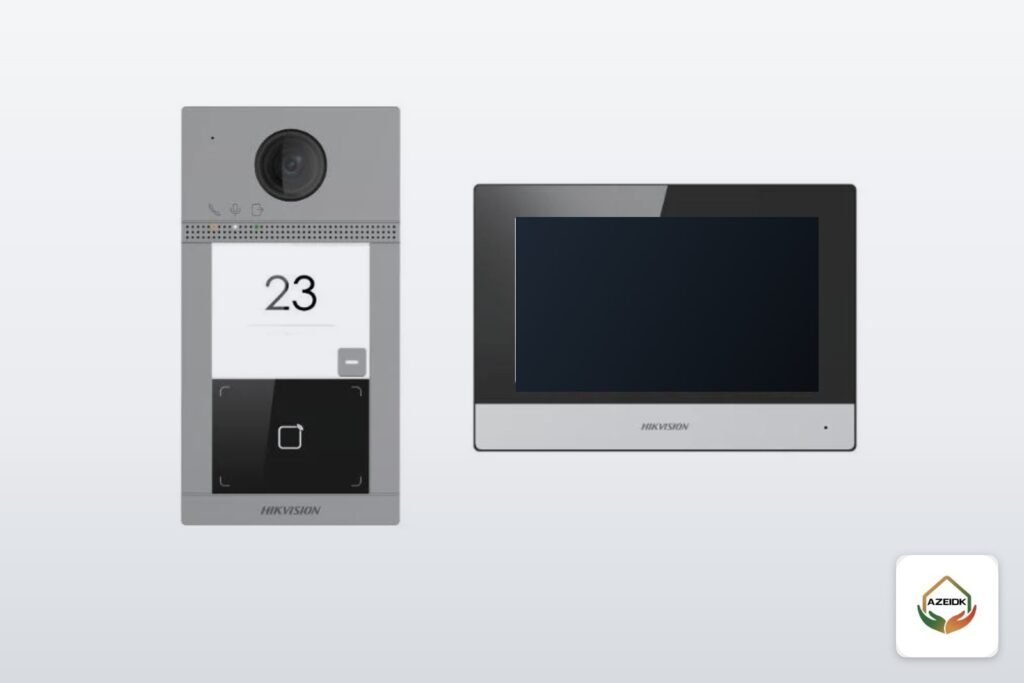
A Hikvision intercom for a villa usually comes as a ready kit, and one of the most requested is the DS-KIS604-S(B) IP video intercom kit. It pairs an outdoor door station with a 1080p camera, a 7-inch touchscreen indoor station and a 4-port PoE switch that powers and networks both units over one cable each. Hikvision’s Hik-Connect app lets you answer visitors and open the door from your phone.
This article is not a general intercom guide. It covers this kit only: what each kit version contains, the door station specifications Hikvision publishes, how versions (B), (C) and (D) differ, the wiring Hikvision documents, the phone setup, and when the kit fits or when you need a larger system.
Key takeaways
- DS-KIS604-S(B) is an IP video intercom kit for one villa or detached house, with a single call button.
- Every version pairs the DS-KV8113-WME1(C) door station with a 7-inch indoor station and a 4-port PoE switch; the indoor station model and the accessories change with the version.
- The door station is rated IP65 and IK08, operates from -40 to 53 °C and is powered by PoE (IEEE 802.3af) or 12 VDC.
- The Hik-Connect app receives calls, shows live video from the door, opens the lock remotely and lets you share the device with other accounts.
- The AZEIDK product page lists the (C) datasheet contents and Hikvision’s (D) datasheet lists different items, so the exact (B) contents are confirmed in the quotation.
In this article
- What is the Hikvision DS-KIS604-S(B) intercom kit?
- Hikvision intercom kit components by version
- Door station specifications and the indoor station
- DS-KIS604-S(B) vs (C) vs (D): what changes?
- How to install and wire a Hikvision intercom kit
- Connecting a Hikvision intercom to your phone with Hik-Connect
- When does the DS-KIS604 kit fit, and when do you need another system?
- Common mistakes when buying and installing a Hikvision intercom
- Hikvision intercom from AZEIDK in Saudi Arabia
- Frequently asked questions
- Summary
What is the Hikvision DS-KIS604-S(B) intercom kit?
Hikvision lists the DS-KIS604 under its IP intercom kits, and the letter in brackets marks the kit version. You will also see it searched as DS-KIS604-SB without brackets; it is the same kit.
The point of a kit is to buy the whole system in one box instead of choosing a door station, monitor and switch separately. Hikvision’s datasheet for the (D) version describes the kit as an IP video intercom for a villa or house with one call button, Hik-Connect mobile control, and storage of messages and captured pictures on a TF card.
The kit belongs to the intercom systems AZEIDK supplies from Hikvision and other brands. If you are still choosing between audio and video, or between 2-wire and IP, start with the intercom guide for villas and apartment buildings and come back here.
Hikvision intercom kit components by version
Kit contents depend on the version letter. The AZEIDK product page lists the contents given in the version (C) datasheet:
- DS-KV8113-WME1(C) outdoor door station: camera, call button, microphone and speaker, mounted on the boundary wall or beside the villa door.
- DS-KH6320-WTE1 indoor station: a 7-inch colour touchscreen to answer, see the visitor and release the door.
- 4-port standard PoE switch: supplies power and network to both units.
- 16 GB TF memory card: for local storage of pictures and messages.
This is the (C) list, not a confirmed (B) list. The product page states that the (B) contents are confirmed with the quotation, and Hikvision’s (D) datasheet lists a different indoor station and different accessories, as the comparison below shows.
Door station specifications and the indoor station
The DS-KV8113-WME1(C) door station is the unit listed on the AZEIDK product page for version (C) and in Hikvision’s official datasheet for version (D). The figures below come from that Hikvision datasheet and agree with the door station figures on the AZEIDK page:
| Item | Door station DS-KV8113-WME1(C) |
|---|---|
| Image | 1920 × 1080 camera, 124° horizontal and 75° vertical field of view, IR light, WDR |
| Audio | Built-in microphone and speaker, noise suppression and echo cancellation |
| Network | 10/100 Mbps Ethernet, Wi-Fi 802.11 b/g/n |
| Power | Standard PoE (IEEE 802.3af) or 12 VDC, under 10 W |
| Protection and environment | IP65 and IK08, -40 to 53 °C, 10 to 95% humidity, outdoor |
| Inputs and outputs | 2 lock control outputs, 2 exit button inputs, 2 door contact inputs, 4 alarm inputs, RS-485, tamper |
| Size and mounting | 174 × 91 × 29 mm, 380 g, surface mount |
The indoor station depends on the version. The AZEIDK product page lists the DS-KH6320-WTE1 with a 7-inch colour touchscreen and Wi-Fi, while Hikvision’s (D) datasheet lists a different model, the DS-KH6320-WTE(B), also with a 7-inch 1024 × 600 capacitive touchscreen. Because the model changes, ask for the indoor station datasheet of the version in your quotation before relying on its power, relay or extension figures.
IP65 means the door station is dust-tight and protected against water jets, and IK08 is its impact rating. The 53 °C upper limit matters in a Riyadh or Eastern Province summer, but it is still better not to face the unit into the midday sun: glare on the lens spoils the picture long before heat affects the device.
DS-KIS604-S(B) vs (C) vs (D): what changes?
The kit is sold under more than one version letter. Hikvision has published an official datasheet for version (D), in a file dated 30 October 2026, while the AZEIDK product page takes its contents from the (C) datasheet. The comparison shows why the model number alone is not enough when you buy:
| Item | (C) per the AZEIDK product page | (D) per the official datasheet |
|---|---|---|
| Door station | DS-KV8113-WME1(C) | DS-KV8113-WME1(C) |
| Indoor station | DS-KH6320-WTE1 | DS-KH6320-WTE(B) |
| Switch | 4-port PoE | 4-port PoE |
| Extra items | 16 GB TF card | Surface mounting accessory, administrator card, 5 key fobs, power supply |
For version (B), the AZEIDK product page states that the contents are confirmed with the quotation, so do not assume it matches either column. In practice: if you want to open the door with a card or key fob, or need a power supply in the box, ask for the full contents list in writing for the version you will receive.
How to install and wire a Hikvision intercom kit
Network wiring through the PoE switch
The kit is fully IP. Hikvision documents that the door station runs on standard PoE (802.3af) or a 12 VDC supply, and the switch in the kit powers the units over the network cable. The usual layout is:
- A network cable from the door station on the boundary wall to a switch port.
- A network cable from the indoor station to another switch port.
- The switch connected to the home router so the system reaches the internet and the app works away from home.
If the run from the wall to the switch location is long, plan the cable route and length before pulling cable, not after.
Lock and exit button
The door station has two lock control outputs, so it can drive the pedestrian gate lock and a second lock, such as the car gate, depending on each lock type. It also has two exit button inputs and two door contact inputs. Lock type (electric strike or magnetic lock), its power supply and the connection method should be checked in Hikvision’s installation guide before work starts, because wrong lock wiring is one of the most common reasons a door will not open. For door release, audio and video faults after commissioning, see common intercom faults and fixes.
Where to mount the units
- Set the door station at a height that frames the visitor’s face within the 124° view without cropping the head.
- Avoid direct sun on the lens or strong light behind the visitor.
- Place the indoor station where the chime is heard across most of the house, such as the living room or near the entrance.
- Keep the switch in a dry, ventilated spot near the router.
AZEIDK handles this work under its installation and implementation service: cabling, mounting, lock connection, then testing and commissioning.
Connecting a Hikvision intercom to your phone with Hik-Connect
Hikvision specifies the Hik-Connect app for this kit. According to Hikvision’s Hik-Connect Mobile Client datasheet (V6.7.0), the app can:
- Receive visitor calls and accept or decline them remotely.
- Show live video from the door station camera with two-way audio.
- Open the door remotely and control connected relays.
- Share the device with up to 10 other accounts so family members get the call too.
The same datasheet lists three ways to add a device: scanning its QR code, by IP address or domain, or by detecting online devices on the same local network as the phone. The app requires Android 6.0 or later, or iOS 11.0 or later.
Two practical points: remote door release depends on a stable home internet connection, and each family member should have their own account instead of sharing one password.
When does the DS-KIS604 kit fit, and when do you need another system?
| Situation | DS-KIS604-S(B) kit | Alternative |
|---|---|---|
| One villa, one entrance | Fits; this is what it is designed for | |
| Villa with pedestrian and car gates | Possible with the two lock outputs, depending on lock types | |
| Villa needing more than one indoor station | Check by version and switch ports | Compatible extra monitors defined in the quotation |
| Apartment building or compound | Not suitable; single call button | Modular door station such as DS-KD8005-IME1 and a building system |
| House with old intercom wires and no network cable | Needs new network cabling | 2-wire system |
For buildings and compounds, choosing a system by building type, and integration with access control and lifts, see video intercom systems for buildings and compounds.
Common mistakes when buying and installing a Hikvision intercom
- Buying by model number without checking the version letter and its contents.
- Running indoor-grade network cable along the boundary wall without protection.
- Driving the lock straight from the door station without checking output capacity and lock type in the installation guide.
- Keeping the default password, or using one shared account in the app.
- Facing the door station into the sun, so visitors’ faces appear dark.
- Relying on weak internet and then concluding that phone unlocking does not work.
Hikvision intercom from AZEIDK in Saudi Arabia
AZEIDK supplies the DS-KIS604-S(B) kit with product selection help, delivery within Saudi Arabia, installation, testing and commissioning, and maintenance contracts, as listed on the product page. Intercom maintenance falls under low-current and CCTV contracts, separate from fire system maintenance contracts. Pricing is set in the quotation according to version, cabling and the locks required.
Frequently asked questions
Can the Hikvision DS-KIS604 intercom open the door from a phone?
Yes, through the Hik-Connect app, which supports remote opening and control of connected relays. It needs a lock wired to the door station and stable home internet.
What app does the Hikvision intercom use?
Hik-Connect, on Android 6.0 or later and iOS 11.0 or later. You add the device by scanning its QR code, by IP address, or from the local network.
Does the door station need a separate power supply?
Not in the usual setup, because the kit’s PoE switch powers it over the network cable. The unit also accepts a 12 VDC supply.
Can a Hikvision intercom handle Saudi summer heat?
The door station is rated to operate up to 53 °C and carries an IP65 rating. It is still best mounted away from direct midday sun.
Is the DS-KIS604 kit suitable for an apartment building?
No. It has a single call button for one villa or house. A building needs a multi-button or keypad door station and an apartment system.
What is the difference between DS-KIS604-S(B) and (D)?
Per Hikvision’s datasheet, version (D) includes the DS-KV8113-WME1(C) door station, a DS-KH6320-WTE(B) indoor station, a PoE switch, an administrator card, 5 key fobs and a power supply. The (B) contents are not published in the sources we checked, so they are confirmed in the quotation.
Summary
The Hikvision DS-KIS604-S(B) intercom kit is a tidy answer for a single villa: a 1080p IP65 door station, a 7-inch touchscreen, a PoE switch that cuts down on cabling, and the Hik-Connect app to answer and open the door from your phone. Before you buy, confirm the version letter and contents; before installation, check lock wiring in Hikvision’s guide; after commissioning, create an account for each family member.
Planning a Hikvision intercom for your villa? Send us the number of entrances, the lock types and where your router sits, and we will prepare a quotation that states the version, its contents and the installation work. Contact the AZEIDK team
See AZEIDK CCTV solutions: supply, installation and maintenance.
Related guides
- IP vs Analog CCTV Cameras: How to Choose for Saudi Projects
- Pharmaceutical Warehouse Fire Protection, CCTV and Access Control for Cold Stores and Controlled Drugs
- Civil Defense Inspection Visit in Saudi Arabia: What the Safety Inspector Checks and How to Prepare
- Recessed Sprinkler vs Concealed and Extended Coverage: When to Use TYCO EC-8C