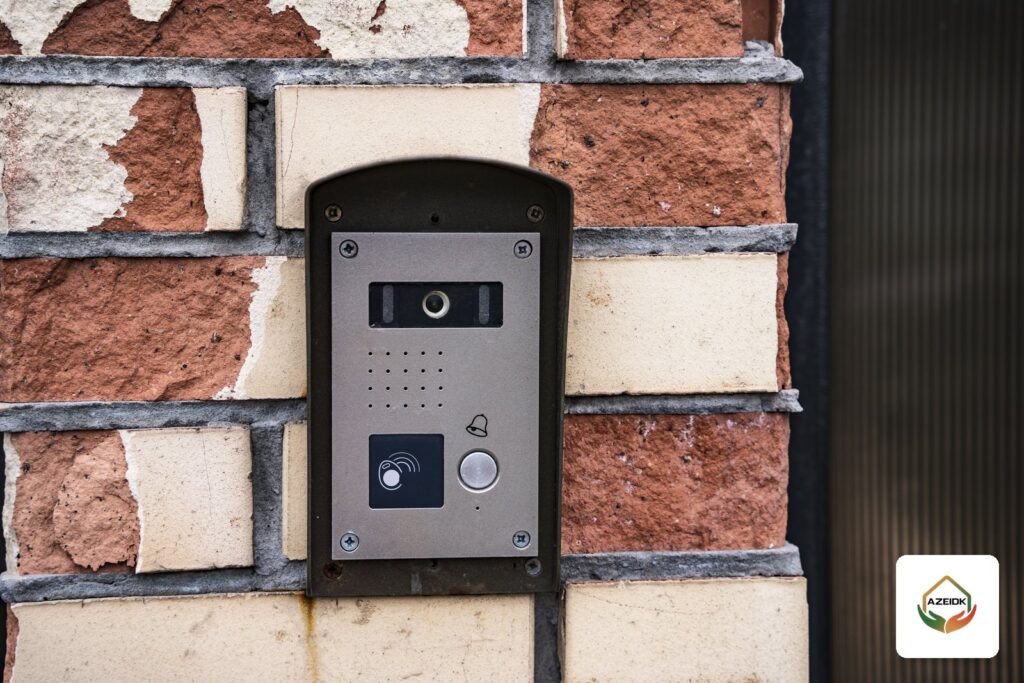
Common intercom faults in Saudi villas and apartment buildings tend to look the same: the visitor talks and nobody hears, the indoor screen stays black, the unlock button does nothing, or the mobile app shows the device offline. Many can be fixed with an orderly check before any part is replaced.
This guide sorts faults by symptom: what an owner or building manager can check, and what needs a technician with a meter. Beyond a quick check, AZEIDK’s corrective maintenance and technical support service covers diagnosis and repair of low current systems.
Short answer: Most intercom faults sit in four areas: audio, video, the door release circuit and the app’s internet path. Find which device is affected and when it started, then check power, cabling, settings and firmware, one change at a time. If the door is on an escape route, or the fault returns, call a technician.
Key takeaways
- One-way audio can come from protective film left on the device, as Hikvision’s support guide notes.
- Dahua lists mismatched firmware between door station and monitor among the causes of missing video.
- In most systems the intercom relay only triggers the release; the lock usually needs its own power supply.
- A lost app connection usually comes from platform access settings, DNS or the router firewall, not the intercom.
- Magnetic locks on emergency exits are designed to release on fire alarm and power loss, so any fault there is a safety fault.
In this article
- How to diagnose intercom faults before calling a technician
- Audio faults: no sound or one-way sound
- Video faults: black screen or poor image
- Why won’t the intercom open the door?
- Why did the intercom lose its mobile connection?
- The call doesn’t ring or the door station can’t reach a monitor
- Common intercom faults at a glance
- Common mistakes when repairing an intercom
- When do you need a technician, and what should you prepare?
- Frequently asked questions
- Conclusion
How to diagnose intercom faults before calling a technician
Before pressing factory reset, write the symptom down. These answers save the technician time:
- Is the fault at the door station, one apartment’s monitor, or every apartment?
- Is it constant or intermittent, and day or night only?
- Did it start after a change: a new router, a firmware update, a power cut, painting or other works?
- Is the system 2-wire or IP, and what are the door station and monitor models?
Then check in order: power, visible cables, settings, firmware. Change one setting at a time and repeat the same test. A factory reset at the start wipes apartment numbers and accounts.
For system components and types, see video intercom systems for buildings and compounds.
Audio faults: no sound or one-way sound
Audio is either fully silent or one-way, and the direction tells you where to look.
The resident hears the visitor, the visitor hears nothing
Hikvision’s guide for this symptom gives two practical causes: protective film left over the speaker or microphone after installation, and encoder settings when the door station is added to an NVR or DVR, where the stream must be set to audio and video, not video only.
The visitor hears the resident, the resident hears nothing
The same guide describes a known issue after a firmware update on some first-generation devices. Its fix: update every device to the same version, restore all to defaults and set them up again.
Audio fails from the app only
Some systems cannot talk from the phone at all. Hikvision states that its first-generation 2-wire intercom cannot start two-way audio from the Hik-Connect app, while the second generation can. Check the datasheet before treating this as a fault.
Video faults: black screen or poor image
If the call rings with audio but no picture, the unit has power. Dahua’s knowledge base lists three checks when there is no video between the door station (VTO) and the monitor (VTH): outdated firmware on one device, a mix of security-baseline and non-security-baseline firmware in the same system, and an abnormal hardware ID. In practice, the first two mean bringing every device to a compatible firmware version.
A washed-out daytime image usually means direct sun or a dusty lens. A black image at night with audio working usually means the infrared (IR) has failed. Clean the lens with a soft cloth and make sure the unit is not behind glass.
On IP systems, a unit that keeps rebooting may be short of PoE power. See PoE switches and power budgets.
Why won’t the intercom open the door?
This fault often needs a technician because the intercom, lock and power supply share one circuit. The unlock button sends a command to a relay in the door station or a separate module, which switches the lock circuit. In most systems the intercom output is only a trigger, and the lock is powered separately.
What to check, in order
- Can you hear the relay click? A click confirms the command arrived, not that the circuit is right.
- Is the lock getting power? An electric lock without a suitable supply will not move, whatever the relay does.
- Is the lock on the right terminal, normally open (NO) or normally closed (NC)? The lock type decides; the wrong one leaves the door always open or never open.
- Is the unlock time suitable? Too short, and the lock closes before the door is pushed.
- If the door opens from one monitor and not another, the problem is in that monitor’s settings, not the lock.
Second lock and vehicle gates
When a vehicle gate or a second door is connected, the second lock must be enabled in the door station settings. Dahua documents a door station with a separate second-lock module showing “unlock failed”: the run light was not flashing and the measured voltage was below normal. Unlocking worked once the module had its own 12 V supply.
Some indoor monitors have low-voltage signal outputs that cannot drive a lock directly, as explained in intercoms for villas and apartment buildings.
Locks on emergency exits
A magnetic lock on an escape door should release on fire alarm and on power loss, and the release should come from the fire alarm system directly, not from the intercom software. If that door will not open, never bypass it with a temporary jumper. See access controller wiring and fire release of maglocks.
Why did the intercom lose its mobile connection?
When the intercom works inside the home but shows offline in the app, the device is usually fine and the problem is its internet path. Hikvision’s Hik-Connect support page sets out these steps:
- Confirm that Platform Access (Hik-Connect) is enabled in the device settings.
- Set a valid DNS, and confirm the device has internet with a gateway and subnet that match the rest of the network.
- Confirm the router firewall is not blocking the service ports or P2P, and the device is not on the router’s blocked list.
- Reboot the device, then update firmware or restore defaults as a last step.
A frequent cause is a new router or internet provider: new addresses or a new Wi-Fi name, and the device drops off. Wireless units such as the Dahua VTO3311Q-WP door station use 2.4 GHz Wi-Fi only according to their specifications, so they will not join a 5 GHz-only network. For an outdoor door station, a network cable is more reliable where possible.
Dahua systems use the DMSS app, and the logic is the same: device status on the network, then internet, then the account. Each resident should have their own account with defined permissions, not one shared login. Both apps are covered in viewing CCTV cameras on your phone, and the same approach applies here.
The call doesn’t ring or the door station can’t reach a monitor
In apartment buildings each monitor has a programmed apartment number. If a dialled monitor does not ring, the likely causes are a number mismatch between door station and monitor, a monitor that has lost its network registration, or a broken cable to that floor. With a main monitor and extensions, the main one may ring alone because the extensions are not linked to it in settings.
A whole floor of dead monitors usually points to a distributor or joint on that floor; a single apartment points to its cable or monitor.
Common intercom faults at a glance
| Symptom | Likely causes | What you can check | When to call a technician |
|---|---|---|---|
| Visitor can’t hear resident | Protective film, recorder audio setting | Remove film, check volume | If it persists after checking settings |
| Resident can’t hear visitor | Firmware mismatch, damaged microphone | Date of the last update | To align firmware and reprogram |
| Audio but no video | Old firmware, mixed versions, IR fault | Lens condition, day or night | To update firmware and test the unit |
| Door won’t open | Lock power, NO/NC wiring, second lock not enabled | Relay click, unlock from another monitor | Always for circuit measurement; at once on emergency doors |
| Offline in the app | New router, DNS, firewall, Wi-Fi band | Internet, router restart | For network settings or a cable run |
| One apartment doesn’t ring | Apartment number, monitor registration, floor cable | Does the monitor power up and show video? | To test the cable and reprogram |
Common mistakes when repairing an intercom
- Factory reset as the first step, losing apartment numbers and accounts.
- Updating one device and leaving the rest of the system on a different version.
- Powering the lock straight from the intercom output without checking voltage and current in the datasheet.
- Changing several settings at once, so you never know which one fixed or caused the fault.
- Leaving the default password on a device that is connected to the internet.
When do you need a technician, and what should you prepare?
Call a technician when the unit must be opened or the lock circuit measured, when the door is on an escape route, when the fault returns, or when it affects more than one apartment. Have ready the device models, the symptom and when it started, and the last change to the network or power.
AZEIDK supplies intercom systems from Hikvision, Dahua and ZKTeco, including the Hikvision DS-KIS604-S(B) villa kit. For scheduled visits instead of call-outs, the intercom can be added to preventive and scheduled maintenance alongside the other low current systems.
Frequently asked questions
Why is there no sound on my intercom?
Check the direction first. One-way audio points to protective film, the recorder’s audio setting or a firmware mismatch; total silence points to power and cabling.
Why won’t the intercom open the door?
Usually the lock lacks a suitable supply, is wired to the wrong terminal (NO or NC), or the second lock is not enabled. It normally needs a multimeter check.
Why did the intercom disconnect from my phone?
Most often a router change, DNS or firewall settings, or a wireless unit that supports 2.4 GHz only. Also confirm platform access is enabled.
When do I need a technician?
When the unit must be opened or the lock circuit measured, when the door is an emergency exit, or when the fault returns or affects several apartments.
Can an intercom be connected to a phone?
Yes, on supported models, through the maker’s app such as Hik-Connect or DMSS. Not every system supports two-way audio from the phone, so check the datasheet.
Does an intercom camera record video?
It has a camera, but recording depends on the model: some kits use a memory card, others a recorder. If recording stops, check the memory card first.
How do faults differ between IP and 2-wire intercoms?
2-wire faults are usually in cabling, distributors and power; IP faults more often in the network, switch and settings. Either way, start by identifying the affected device.
Conclusion
Two questions pin down most intercom faults: which device is affected, and what changed before it. Then check power, cabling, settings, firmware. The door release circuit, especially on emergency doors, needs a qualified technician.
Intercom down, or only half working? Send us the device models and the symptom, and we will tell you whether it is a settings fix or needs a site visit. Contact the AZEIDK team
Related guides
- Smoke Detector Types: Optical, Ionisation or Multisensor, and Which Model for Each Room
- Victaulic in Saudi Arabia: Fire Sprinklers by AZEIDK
- FM200 Calculation for a Room: Formula, Design Concentration, Temperature Factor and Cylinder Size
- Fire Alarm Cable (Fire Alarm Wire): Types, Sizes and What the Consultant Asks Before Supply