A gym access control system is a face recognition terminal, card reader or QR reader at the entrance, linked to a turnstile or door, that checks a member’s subscription status before letting them through. Linked to the membership software, it blocks expired memberships automatically and logs every entry with name and time.
This article covers the parts of a member entry system, how face, card, fingerprint and QR compare in a gym, how to choose the gate, and what is needed to link the system to membership software and to the fire alarm. AZEIDK supplies ZKTeco, Hikvision and Dahua access control devices and gates through its security and surveillance systems, and sector solutions are on the gyms and sports facilities page.
Key takeaways
- The system has three parts: an identification device at the entrance, a gate or door it releases, and software that knows the subscription status.
- Face recognition is the fastest and most hygienic option in a gym because it is touch-free; cards or QR suit guests and short-term passes.
- Membership software connects to access devices through a manufacturer interface, so confirm support before buying.
- Gates and doors must open on fire alarm or power loss as the approved design requires, so access control never blocks evacuation.
- The same device can record staff and trainer attendance.
In this article
- How does a gym access control system work?
- Face, card, fingerprint or QR? How they compare in a gym
- Choosing the gate: tripod, flap, swing or door?
- Gym access control and fire evacuation
- Settings that help gyms in particular
- Member data: face images and fingerprints
- Implementation steps in a new or existing gym
- Frequently asked questions
- Summary
How does a gym access control system work?
The member stands in front of the terminal or presents a card. The device identifies them and checks the member database: is the subscription valid, and is entry allowed at this time? If yes, it signals the gate to open and logs the event. If the membership has expired or is frozen, entry is refused and reception sees the reason.
There are two ways to tie the decision to subscription status:
- Direct link with membership software: the gym management software sends member data and expiry dates to the access devices through a manufacturer SDK or API. This is the better option because expired memberships stop without manual work.
- The manufacturer’s own access software: each member is enrolled with an access right that has an end date. It works for small gyms but means entering data twice.
Before buying hardware, ask your membership software provider which devices and models it supports. That one question prevents many problems after installation.
Face, card, fingerprint or QR? How they compare in a gym
| Method | Strengths in a gym | Watch points |
|---|---|---|
| Face recognition | Fast, touch-free, cannot be forgotten or lent | Entrance lighting, a clear enrolment photo for each member, personal data protection |
| Card (RFID) | Cheap and easy to issue | Cards get lent and lost, so a block-and-reissue procedure is needed |
| Fingerprint | Accurate and low cost | Sweaty or chalked hands reduce read rates, and the reader needs frequent cleaning |
| QR code on phone | Suits guest passes, single classes and short-term memberships | Needs a QR-capable reader and a dynamic or time-limited code so screenshots cannot be shared |
Many gyms combine two methods: face for regular members, QR or card for guests. One multi-method example is the ZKTeco FaceTima 8, which combines face, fingerprint, card and QR, covered in ZKTeco face recognition terminal. In the Hikvision range, MinMoe face terminals work with the DS-K2801 controller, as explained in Hikvision Access Control.
Choosing the gate: tripod, flap, swing or door?
The gate is what actually stops two people entering on one credential. The choice depends on peak-hour traffic and the entrance layout:
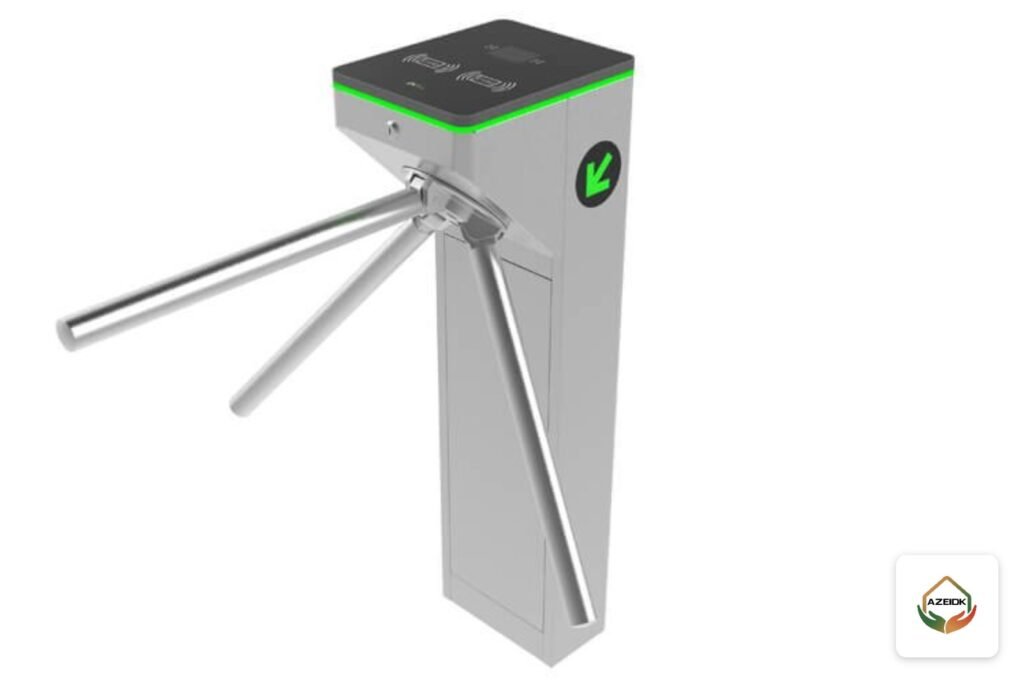
- Tripod turnstile: simplest and lowest cost, one person per rotation, suits medium-sized gyms.
- Flap or swing gate: better appearance at reception; a wide swing lane serves wheelchair users and people carrying equipment.
- Full-height turnstile: for unattended entrances, such as gyms that open some hours without reception staff.
- Door with magnetic lock: for very small studios, noting that it does not stop a second person following the member.
A detailed comparison is in turnstile gate types.
Gym access control and fire evacuation
No gate or door on an escape route may trap people inside. The access controller is therefore linked to the fire alarm panel so gates open or magnetic locks release on alarm, and also on power loss depending on the lock type. Review this with the life safety designer and Civil Defense requirements, because emergency exits themselves must stay usable without identification.
A wide gate or emergency door next to the turnstiles is a common solution, provided it is covered by a camera or an opening alarm so it does not become a second entrance.
Settings that help gyms in particular
- Time schedules: morning-only memberships or specific days, enforced automatically.
- Anti-passback: a second entry on the same credential is refused until an exit is logged, which limits card lending.
- Membership freeze: suspend access temporarily without deleting the member.
- Staff and trainer attendance: the same device logs time and attendance, with reports from the attendance software.
- Multiple branches: central management lets members enter only the branches included in their package.
Larger gyms with several entrances or restricted internal doors (staff rooms, stores) use controller-based systems such as ZKTeco InBio and C3 panels instead of standalone devices. The difference is explained in standalone fingerprint and card door access.
Member data: face images and fingerprints
Face images and fingerprint templates are personal data. Store them on protected devices and software accounts, give export rights to a few people, and delete a member’s data when they leave, in line with your published privacy policy. Review what the Saudi Personal Data Protection Law requires for your activity with your legal adviser.
Good practice is to tell members at sign-up that entry uses face recognition and to offer an alternative such as a card or QR for anyone who prefers not to enrol a photo. It reduces friction at reception and keeps the system acceptable to everyone.
Implementation steps in a new or existing gym
- Survey: entrance width, reception counter position, escape route, nearest power and network points.
- Software decision: will the current membership software stay, and which devices does it support?
- Device selection: terminal, gate and controller if needed, each with its datasheet.
- Containment and cabling: network and power to each device, a signal cable from the fire alarm panel to the controller, and gate earthing.
- Installation and programming: gate fixed on level flooring, terminal at a suitable face height, members enrolled or synchronised from the software.
- Testing: entry with a valid and an expired membership, anti-passback, simulated fire alarm to confirm the gate opens, and power cut to confirm lock behaviour.
- Handover: train reception to add and suspend members and export the event log, and hand passwords to the owner.
In an operating gym, install outside opening hours and keep a temporary entry method for the first day until every member is synchronised.
Frequently asked questions
What is the best access control system for a gym?
For most gyms: a face recognition terminal that also accepts card or QR for guests, a turnstile, and a link to the membership software. Final choice follows member numbers and entrance layout.
Can the access device connect to gym membership software?
Yes, if the software supports the device’s integration interface. Check the provider’s supported device list before buying.
Is fingerprint suitable for member entry?
It works, but sweaty or chalked hands can reduce read rates, which is why many gyms prefer face recognition.
What happens to the gates on fire alarm?
They are linked to the alarm panel so they open or their locks release on alarm, as the approved design requires, so evacuation is not obstructed.
Does the device also record staff attendance?
Most devices do, with time and attendance reports from the manufacturer’s attendance software.
How do I stop members lending their cards?
Enable anti-passback or move to face recognition, with an entrance camera showing who passed.
Summary
Choose a gym entry system in this order: membership software and what it supports, identification method, gate, then the fire alarm link. For the wider picture see gym fire safety requirements.
Want member entry linked to your membership software? Send us the software name, member count and a photo of the entrance, and we will propose the terminal and gate with datasheets. Contact the AZEIDK team
Related guides
- Hood Safer in Saudi Arabia: Kitchen Hood Fire Suppression
- Fire Sprinkler Leak or Accidental Discharge: What to Do, How to Close the Valve, Who Replaces the Head
- AFC NRS Gate Valve with Vertical Indicator Post (PIV): Protecting Underground Fire Main Valves and Reading Open/Shut Above Grade
- Firefighter Smoke Control Panel: Location, ON-AUTO-OFF Switches, Indicator Colours and Command Priority