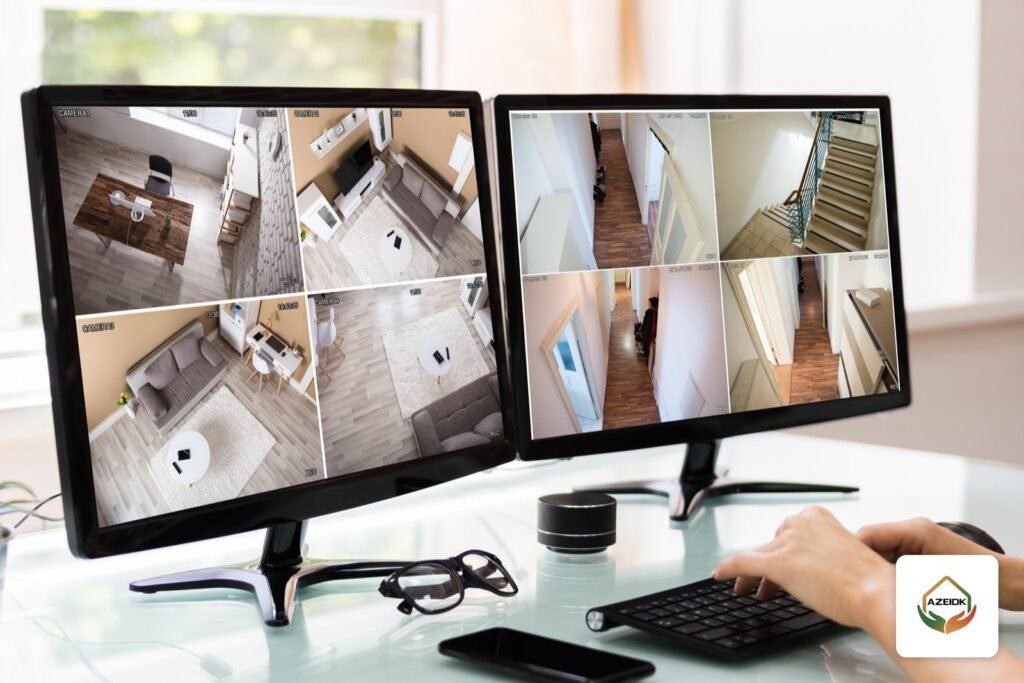
The right CCTV monitor is one whose input and resolution match the output of your recorder (NVR or DVR), whose size suits the number of cameras shown at once and the viewing position, and whose datasheet states it is built for continuous 24/7 operation. Everything else is a site detail.
This guide is for shop, office and villa owners in Saudi Arabia who have a camera system and want a CCTV screen at the till, in the manager’s office or in the guard room. It covers screen size against the number of tiles, the output resolution of the recorders listed on our site, HDMI versus VGA, and how to show the cameras on the screen step by step. AZEIDK supplies the monitor as part of the complete CCTV system, together with the recorder, installation and display setup, under security and surveillance systems.
Key takeaways
- Start with the recorder: the small DVRs we list output up to 1920 × 1080, while the Hikvision DS-7608NXI-K1(B) NVR outputs up to 4K (3840 × 2160) at 30 Hz on HDMI and 1920 × 1080 on VGA.
- Tiles divide the screen’s resolution: on a 1080p screen each tile in a 16-way split gets only 480 × 270 pixels.
- HDMI is digital and also carries audio; VGA is analogue, picture only, and tops out at 1080p on these recorders.
- A surveillance monitor’s datasheet states 24/7 operation. Do not assume it for a screen that does not.
- For occasional viewing a phone or PC may be enough; for many cameras and operators the answer is a control room with a video wall.
In this article
- Is a CCTV monitor different from a PC monitor or a TV?
- How to choose CCTV monitor size by number of cameras
- What resolution should a CCTV screen have?
- HDMI or VGA for a CCTV monitor?
- How to display CCTV cameras on a monitor, step by step
- Viewing on a phone or PC instead
- When one screen is no longer enough
- Common CCTV monitor mistakes
- Frequently asked questions
- Conclusion
Is a CCTV monitor different from a PC monitor or a TV?
For connection, not much: any screen with an HDMI or VGA input that supports the recorder’s output resolution will show the picture. The difference is duty. An office PC monitor runs during working hours and switches off. A CCTV screen at the till or in the guard room runs day and night with a largely static image.
That is why manufacturers rate surveillance monitors for continuous use. For example, the datasheet of a 22-inch Hikvision monitor says it is built “for 24/7 use” and lists HDMI and VGA inputs, 1920 × 1080 resolution and a 100 × 100 mm VESA mount. These are the lines to read on any monitor before approving it:
- Continuous operation: an explicit 24/7 or 24 hours a day statement on the datasheet.
- Inputs: at least HDMI and VGA, so you keep options if the recorder changes.
- Native resolution: 1920 × 1080 or 3840 × 2160 depending on the recorder output.
- Mounting: VESA holes for a wall arm or bracket, common at tills and receptions.
A home TV also works over HDMI and suits a villa where viewing is occasional. In a shop where the picture stays on all day, ask for a monitor whose datasheet states continuous operation.
How to choose CCTV monitor size by number of cameras
The real question is not “how many inches?” but “how big will one tile be?”. With 9 or 16 cameras on screen, they share the screen’s area and resolution. The table assumes a 16:9 screen; widths are approximate:
| Screen size | Picture width | Tile width, 4-way | 9-way | 16-way |
|---|---|---|---|---|
| 24 in | 53 cm | 26.6 cm | 17.7 cm | 13.3 cm |
| 32 in | 71 cm | 35.4 cm | 23.6 cm | 17.7 cm |
| 43 in | 95 cm | 47.6 cm | 31.7 cm | 23.8 cm |
| 55 in | 122 cm | 60.9 cm | 40.6 cm | 30.4 cm |
- Small shop, 4 cameras, screen at arm’s length by the till: 22 to 24 inches in a 4-way split gives clear tiles.
- Office or shop, 8 to 9 cameras watched from a desk: 32 inches keeps a 9-way split readable.
- Villa or warehouse, 16 cameras watched from a guard room or sofa: 43 inches or larger, or two screens each showing part of the cameras.
The best viewing distance test is practical: stand where the viewer will actually sit, show the split that will be used daily, and check that you can recognise a face at the entrance in the door camera’s tile. If you cannot, use a bigger screen or fewer tiles.
What resolution should a CCTV screen have?
Resolution is set by the recorder output and the number of tiles together. A 4K screen on a recorder that only outputs 1080p will show 1080p. A recorder outputting 4K to a 1080p screen must be set to a resolution the screen supports.
Video outputs of the recorders listed on the AZEIDK site, per the manufacturer’s datasheet or our product page:
| Recorder | HDMI output | VGA output | Output mode |
|---|---|---|---|
| Hikvision DS-E04HGHI-E (4-channel DVR) | Up to 1920 × 1080 / 60 Hz | Up to 1920 × 1080 / 60 Hz | Not stated on the product page |
| Hikvision DS-E04HQHI-B (4-channel DVR) | Up to 1920 × 1080 / 60 Hz | Up to 1920 × 1080 / 60 Hz | Simultaneous (same picture) |
| Hikvision DS-7608NXI-K1(B) (8-channel NVR) | Up to 3840 × 2160 / 30 Hz | Up to 1920 × 1080 / 60 Hz | Independent outputs |
In short: with a 4-channel DVR a Full HD (1920 × 1080) screen is enough and 4K adds nothing. With an NVR that outputs 4K over HDMI, a 4K screen pays off in 9- or 16-way splits, because each 16-way tile gets 960 × 540 pixels instead of 480 × 270 on 1080p.
Also check the recorder’s decoding capacity, which limits how many high-resolution cameras can be shown live. Our DS-7608NXI-K1(B) page, for example, lists 1 channel at 12 MP, 4 channels at 4 MP or 8 channels at 1080p with AI functions off. For choosing the recorder itself, see our CCTV recorder selection guide.
HDMI or VGA for a CCTV monitor?
| Item | HDMI | VGA |
|---|---|---|
| Signal | Digital | Analogue |
| Maximum resolution on the recorders above | Up to 4K on the listed NVR, 1080p on the DVRs | 1080p |
| Audio | Carries audio (Hikvision datasheet lists audio output via HDMI) | Picture only |
| Typical use | Main screen, modern TVs | Second screen or older monitor |
In Hikvision NVR manuals, when both ports are connected HDMI is the main output and VGA the auxiliary output. On recorders with independent outputs each screen can show different content, for example sales-floor cameras at the till and store-room cameras in the manager’s office. On simultaneous-output recorders both screens show the same picture.
If the screen is far from the recorder, do not simply run a long HDMI cable. Plan the recorder’s rack position close to the screen, or show the cameras on a remote screen over the network with a PC and management software, as described below.
How to display CCTV cameras on a monitor, step by step
- Connect: HDMI or VGA cable from the recorder output to the screen input, then select that input on the screen.
- Set output resolution: in the recorder settings choose a resolution equal to or below the screen’s native resolution. If the screen goes black after a change, go back to a lower supported resolution.
- Multi-view layout: in Live View choose the number of tiles. Hikvision’s NVR manual lists 1, 4, 6, 8 and 16-window divisions depending on model, so check which layouts your recorder offers before planning a 9-way (3 × 3) grid.
- Order the cameras: put the key cameras (till, main entrance, safe) in the first or larger tiles and move the rest to a second page.
- Auto-switch: if there are more cameras than tiles, enable auto-switch between camera groups. Hikvision’s manual notes the dwell time per screen is set in the Live View settings before enabling auto-switch.
- Protect access: enable screen lock or auto logout so nobody standing at the till can open or delete recordings.
If one tile shows No Video, the fault is usually the camera or its cable rather than the screen. See common CCTV camera faults.
Viewing on a phone or PC instead
Not every site needs a permanent screen. In a villa or small office many owners use Hik-Connect or DMSS on the phone for live view and motion alerts, with a small screen next to the recorder for setup and playback only. Secure setup and user permissions are covered in viewing CCTV cameras on your phone.
To show cameras on a screen away from the recorder, such as a manager’s office on another floor, a PC running iVMS-4200 or SmartPSS reads the cameras over the network, as in our CCTV software for PC article.
When one screen is no longer enough
One or two screens suit a shop, office or villa. When cameras run into dozens, a duty operator watches them, and there are several buildings or branches, the answer is a control room with a video wall, operator workstations and management software. That enterprise option is covered in security control room setup. For shops, our CCTV cameras for shops guide helps decide which cameras deserve a fixed place on screen.
Common CCTV monitor mistakes
- Buying a 4K screen for a DVR that outputs no more than 1080p.
- Showing 16 cameras on a 24-inch screen, leaving tiles about 13 cm wide where faces cannot be recognised.
- Using a screen whose datasheet does not state continuous operation in a shop where it runs all day.
- Mounting the screen where customers can see it while it shows the safe or store room.
- Leaving the recorder interface unlocked on a public screen.
Frequently asked questions
What size CCTV monitor do I need for 8 cameras?
For a 9-way split viewed from a desk, 32 inches gives tiles about 23 cm wide. For viewing from further away, choose 43 inches.
Can I connect CCTV cameras to a TV?
Yes, through the recorder’s HDMI output. That suits a villa and occasional viewing; for all-day operation choose a monitor whose datasheet states 24/7 use.
Why is there no picture on the CCTV screen after connecting it?
Check the screen’s input selection, then that the recorder’s output resolution is supported by the screen. If the menu shows but one camera is missing, the fault is in that camera or its cable.
Do I need a 4K CCTV monitor?
Only if the recorder outputs 4K over HDMI and you show 9 or more cameras at once. With a 4-channel DVR, Full HD is enough.
Can one recorder drive two screens?
Yes, via HDMI and VGA. Recorders with independent outputs can show different cameras on each screen; simultaneous-output recorders show the same picture on both.
Does AZEIDK supply the monitor with the CCTV system?
Yes. AZEIDK supplies the monitor as part of the CCTV system with the recorder, installation and display setup, sized to the number of cameras and viewing position.
Conclusion
Choosing a CCTV monitor starts with the recorder output, then the number of cameras shown together, then the viewing position and daily running hours. A 24-inch Full HD screen suits a 4-camera shop, 32 to 43 inches suits 9 to 16 cameras, and a 4K screen is worth it only with a 4K-output recorder and a large split.
Setting up CCTV for your shop, office or villa? Tell us the number of cameras, where the screen goes and who will watch it, and the AZEIDK team will propose the recorder and monitor and set up the display at handover. Talk to the AZEIDK team
Related guides
- Flame Detectors (UV / IR / IR3) in Industrial Facilities
- Novec 1230 Fire Suppression After 3M: Refills and Alternatives
- CCTV Camera Brackets and Housings: Wall, Ceiling and Extension Mounts, Junction Boxes and Protective Housings
- Dry Powder Fire Extinguishers: ABC vs BC, Where to Use Them and Where Not