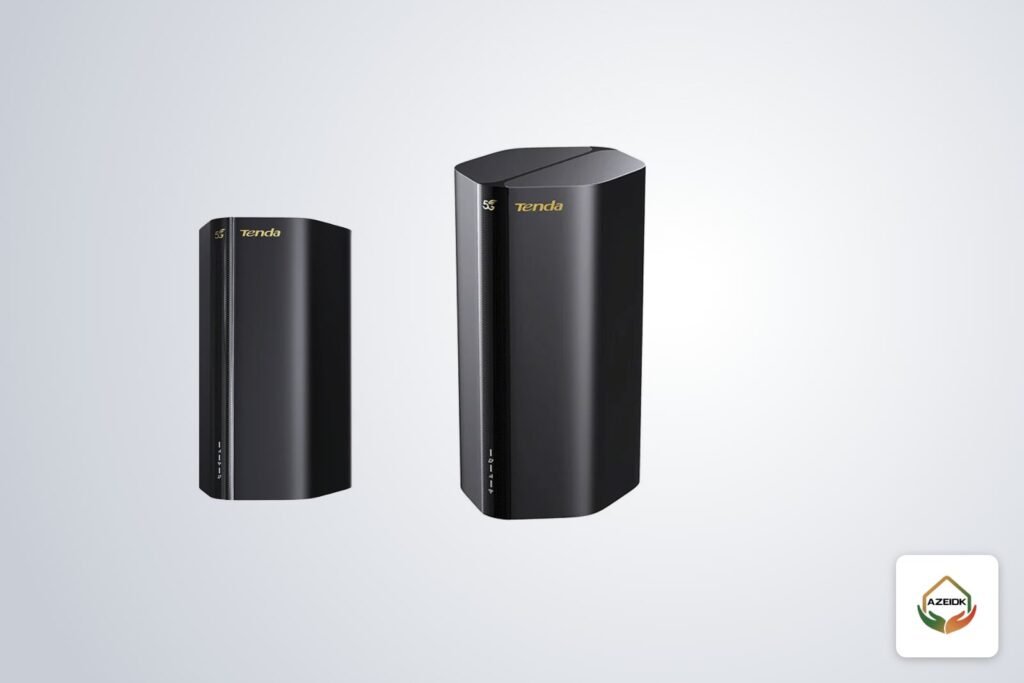
A 5G router is the fastest answer for a site that fibre has not reached yet: a rest house or farm, a temporary site office, a new shop waiting for its line, or an office that wants a backup internet link that does not share the same cable. You put a data SIM in the router and it shares the connection over Wi-Fi and Ethernet. This article explains when a 5G router is enough and when it is not, using the Tenda 5G03 supplied by AZEIDK as the example. All specifications come from the product page and the official datasheet.
AZEIDK supplies the Tenda 5G03 router as part of its network and communication systems, with installation and setup across Saudi Arabia.
Quick answer
- A 5G router suits sites without fibre, temporary sites and a backup line next to fibre.
- The Tenda 5G03 takes a Nano SIM, shares the connection over AX1800 Wi-Fi 6 and supports 5G in SA and NSA modes with fallback to 4G and 3G.
- The 4.67 Gbps download and 1.25 Gbps upload figures are theoretical; real speed depends on operator coverage and the SIM plan.
- Two TS-9 ports for an external antenna solve weak signal inside buildings and on farms.
- One Gigabit port works as WAN for a fixed line, so the router also serves as a backup link.
- It is an indoor router (0 to 40 °C), so it does not go in a hot rooftop room or outdoors.
When a 5G router is the right answer
- Rest houses, farms and remote villas: fibre does not reach them, and the need is home internet and the camera app. Camera advice for these sites is in CCTV for farms and rest houses.
- Project sites and temporary offices: the site runs for months and then moves, so a fixed line is not worth it.
- A new shop or office: work starts before the line arrives, then the router stays as backup.
- Backup line: when the fibre drops, point-of-sale, attendance and monitoring keep running.
When is it not enough? A company network with dozens of staff, many VPN links and cameras recording to the cloud needs a fixed line and a business router, as in business routers and VPN gateways. A 5G router can then serve as the second line only.
Tenda 5G03 specifications that matter to a buyer
| Item | Value (datasheet) | What it means for you |
|---|---|---|
| Cellular | 5G NR (SA / NSA), 4G LTE, 3G | Runs on 5G where available and falls back to 4G automatically |
| Theoretical speed | 4.67 Gbps download, 1.25 Gbps upload | A theoretical ceiling; real speed is lower and depends on coverage |
| Wi-Fi | Wi-Fi 6 AX1800, 574 Mbps on 2.4 GHz and 1201 Mbps on 5 GHz | Covers an apartment, small villa or office, with EasyMesh to extend |
| Connected devices | Up to 128 | Enough for a home or small office plus cameras |
| Antennas | 8 internal cellular antennas, 2 TS-9 external antenna ports | Add an external antenna where signal is weak |
| Ethernet | 1 Gigabit LAN/WAN, 1 Gigabit LAN | Connect a recorder or switch, or a fixed line on WAN |
| VPN | PPTP client and server, L2TP client, IPsec | Simple link to the head office |
| Operating environment | 0 to 40 °C, 10% to 90% RH non-condensing | Indoor installation in a cooled space |
Before you buy: check coverage and bands
The operator’s signal at your location matters more than the router’s specifications. The datasheet lists the supported 5G bands, including n1, n3, n28, n41, n77 and n78, and 4G bands such as 1, 3, 20, 38 and 40. Ask your SIM operator which band serves your site, compare it with the list and test the SIM on a phone at the same spot before installation. If the signal is good by the window and weak in the middle of the building, place the router near the window and distribute by cable or EasyMesh nodes, or fit an external antenna to the TS-9 ports.
Also note that routers and Wi-Fi devices in Saudi Arabia need a SABER certificate of conformity, as covered in SASO 3114 for ICT equipment.
A 5G router with CCTV
Remote viewing and cloud recording depend on upload speed, not download. Connect the NVR to a LAN port, keep recording local on the hard drive and use the internet only for viewing, which keeps data use down. On a capped plan, set the sub-stream to a lower quality for phone viewing. For SIM cameras versus wired cameras see wireless CCTV cameras.
Common mistakes
- Placing the router in a closed central room or inside a metal cabinet, which weakens the signal.
- Installing it in an uncooled rooftop room when its operating limit is 40 °C.
- Relying on theoretical speed to drop the fixed line for a large company.
- Leaving the default admin password unchanged.
Frequently asked questions
Does the Tenda 5G03 work with Saudi operator SIMs?
It takes a Nano SIM and supports automatic APN. The condition is that the operator’s band at your location is among the bands in the datasheet, and that the SIM has a suitable data plan.
Can I use it with a fibre line?
Yes. One Gigabit port works as WAN for a fixed line, so it can be the main router or the backup link.
How many devices can connect?
Up to 128 according to the datasheet; real speed per device depends on signal and plan.
Can it be installed outdoors?
No. It is an indoor unit rated 0 to 40 °C. Where signal is weak, the external antenna goes outside and the router stays inside.
Site without fibre? The AZEIDK team decides where the router goes and whether an external antenna or EasyMesh nodes are needed, then installs and configures the network. Request a quote
Related guides
- CCTV Media Converter: When Remote Cameras Need Fibre and How to Choose
- Fire Safety Log Book and Maintenance Records for Civil Defense Inspection and Salamah Renewal
- Fire Extinguishers for Wedding Halls and Event Venues: Quantity, Types and Mounting in the Hall and Kitchen
- Sprinkler Design Software and Fire Protection Design Tools: Hydraulic Calculation, Fire Alarm Design and What the Designer Should Deliver