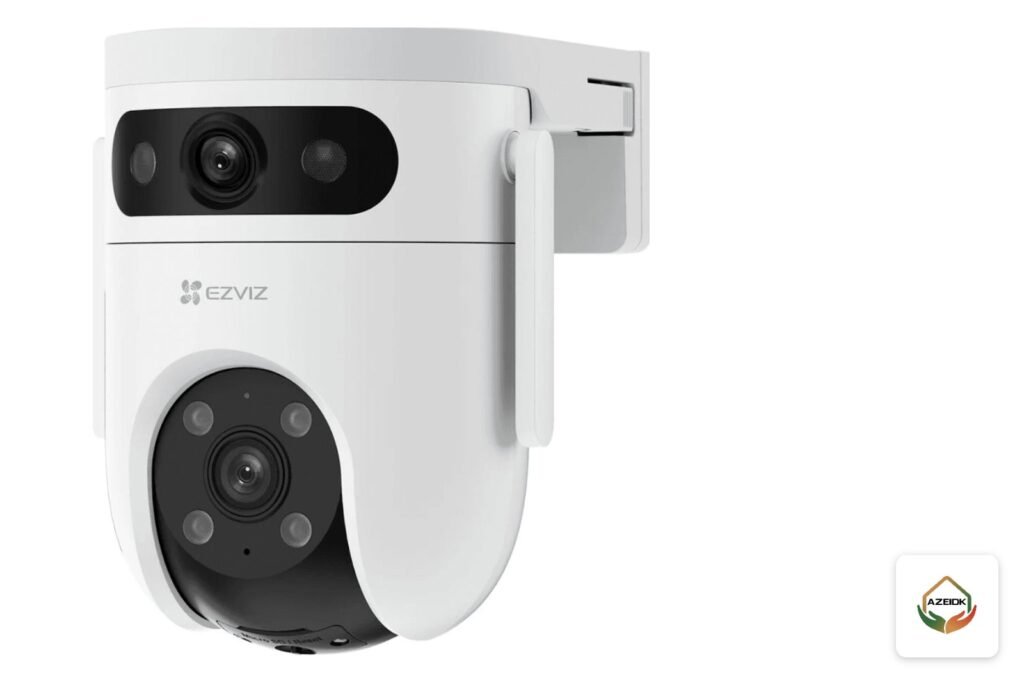
The EZVIZ H9c is an outdoor camera with two lenses in one body: a fixed wide-angle upper lens that watches the whole scene, and a lower pan/tilt lens that turns 350° horizontally and 80° vertically and follows a person once the upper lens detects them. AZEIDK supplies two versions, the H9c Dual 2K and the H9c Dual 3K, as part of its security and surveillance solutions.
For camera types, resolution, night vision and storage, see our CCTV cameras guide for Saudi Arabia.
This guide covers the manufacturer’s specs, how the two lenses work together, installation and app setup, and where the camera fits a home or shop.
Key points
- Two lenses: fixed 2.8 mm (about 108° horizontal) and pan/tilt 6 mm (about 55° horizontal), both F1.6.
- 2K version at 2304 × 1296; 3K version at 2880 × 1620.
- Black-and-white night vision to 30 m, plus colour night vision with four built-in spotlights.
- Human and vehicle shape detection, auto tracking, siren and strobe deterrence.
- microSD up to 512 GB or EZVIZ CloudPlay; Wi-Fi on 2.4 GHz only, or wired Ethernet on the 2K version.
How does the EZVIZ H9c dual-lens camera work?
The upper lens gives a fixed wide view, so nothing in the scene is lost. The lower lens moves and zooms in. EZVIZ says that when the upper lens detects a person, the pan/tilt lens turns to lock on and record them, even when the lenses face different areas. The moving lens can also patrol a custom route, four presets or a full circle.
In practice one camera does the job of two in a courtyard or shopfront. It is still one camera on one power feed and one network, so if it fails or is unplugged, both lenses stop.
EZVIZ H9c specifications
| Item | H9c Dual 2K | H9c Dual 3K |
|---|---|---|
| Sensor | 1/2.7″ CMOS | 1/2.7″ CMOS |
| Max resolution | 2304 × 1296 | 2880 × 1620 |
| Fixed lens | 2.8 mm F1.6, 108° horizontal | 2.8 mm F1.6, 110° horizontal |
| Pan/tilt lens | 6 mm F1.6, 55° horizontal | 6 mm F1.6, 56° horizontal |
| PT range | Pan 350°, tilt 80° | Pan 350°, tilt 80° |
| Night vision | B/W 30 m; colour with 4 spotlights | B/W 30 m; colour with 4 spotlights |
| Compression | H.265 / H.264 | H.265 / H.264 |
| Storage | microSD up to 512 GB, CloudPlay | microSD up to 512 GB, CloudPlay |
| Wi-Fi | 802.11b/g/n, 2.4 GHz | 802.11b/g/n, 2.4 GHz |
| Ethernet | RJ45 10/100 | Not listed on the product page |
| Power | 12 V DC, 1.5 A, 12 W max | 12 V DC, 1.5 A, 12 W max |
| Operating temperature | -30 °C to 50 °C | Not listed on the product page |
2K figures are from the official EZVIZ page; 3K figures from AZEIDK’s product page. EZVIZ lists no specific IP rating for the 2K, only a “weatherproof design”, so we mount it under an overhang where possible, away from all-day direct sun.
Night vision and deterrence
Night modes are colour, smart and black-and-white, with a 30 m black-and-white range. EZVIZ says colour range can reach 40 m when both lenses face the same direction, otherwise 30 m. The camera adds a siren and strobe lights, two-way talk and recorded voice messages played on motion. For other night technologies see night vision CCTV cameras.
Storage: microSD or cloud?
The camera records to microSD up to 512 GB or to EZVIZ CloudPlay, a separate subscription whose availability varies by market. EZVIZ states that H.265 uses about half the storage of H.264 in its tests, depending on scene activity. A card is cheaper and records without internet, but it sits inside the camera, so if the camera is stolen the footage goes with it. Since the card is written day and night, use a high-endurance card made for continuous recording and check playback in the app now and then to confirm it still works. Cloud keeps an off-site copy but needs stable internet with enough upload speed; see how much internet CCTV uses and our Wi-Fi CCTV camera guide.
Installing the EZVIZ H9c and linking it to your phone
- Pick the spot: a height that covers the entrance or courtyard, near power, with strong 2.4 GHz Wi-Fi or a network cable if possible.
- Fix the camera firmly to the wall and protect the power joint from water and dust.
- Insert the microSD card before power-up and format it in the app.
- Add the camera in the EZVIZ app following its add-device steps, then enter your 2.4 GHz Wi-Fi details.
- Set detection zones away from the street and trees, and use human detection instead of generic motion to cut alerts.
- Change the default password, use a strong app account password, and share access with family members with limited rights.
If the camera shows offline, see camera offline in Hik-Connect or EZVIZ.
When the H9c fits
| Situation | Good fit? |
|---|---|
| Villa courtyard or home entrance | Yes: one lens for the yard, one to follow visitors |
| Small shopfront or office | Yes, recording to card or cloud |
| Large car park or long fence | Usually not; use IP cameras with a recorder or a PTZ |
| Facility needing central recording for dozens of cameras | No; use an NVR system |
See EZVIZ vs Hikvision for how the home and business lines differ, and EZVIZ cameras for shops and homes for other models.
What the law allows outside your home
Point the camera at your own property: yard, door and car. Avoid neighbours’ windows and homes, keep the public street to a minimum, and use privacy masking where needed. More in installing a CCTV camera outside your home in Saudi Arabia.
H9c or two separate cameras?
The H9c cuts cabling: one power point and one connection instead of two, with both lenses in one app view. Linked tracking is its real advantage, since the fixed lens detects and the moving lens zooms in automatically, which two ordinary separate cameras do not do.
Two separate cameras, on the other hand, can sit in different places, say one at the door and one at the far end of the yard, covering angles a single position cannot see, and one failure does not stop the other. If the courtyard is open to one viewpoint, the H9c is practical; if it has corners and walls, spread more cameras.
FAQ
Does the EZVIZ H9c work without internet?
It records to microSD without internet once set up, but remote viewing, phone alerts and cloud need internet.
Does the H9c support 5 GHz Wi-Fi?
No. EZVIZ lists 2.4 GHz only. The 2K version has an RJ45 port if Wi-Fi is weak.
What is the difference between the H9c Dual 2K and 3K?
Mainly resolution: 2304 × 1296 versus 2880 × 1620. Lenses, PT range and night vision are similar.
Does the H9c need a subscription?
Not for tracking and dual-lens linkage, per EZVIZ. A subscription is only needed for CloudPlay storage.
How long will a 512 GB card record?
It depends on resolution, bitrate and recording mode. Motion-only recording lasts much longer than continuous recording.
Can the H9c connect to an NVR?
The product pages do not mention NVR connection; main recording is card or cloud. For central recording, use IP cameras with an NVR.
Need a camera for your courtyard or shopfront? Send us a photo of the spot and its distance from the router, and we will suggest the right EZVIZ camera or a recorder-based system if you need one. Contact the AZEIDK team
Related guides
- Context Plus Addressable Heat Detectors: Applications and Installation Basics
- Fire Extinguisher Covers for Outdoor Use: Plastic Covers, Cages and Cabinets Against Sun and Dust
- Fire System Maintenance for Schools and Universities: Contract Scope, Inspection Calendar and the Summer Break
- Home Fire Extinguisher Guide: Type, Size, Placement and Monthly Check