People buy a Wi-Fi CCTV camera because it goes up in minutes: a power socket, a phone app and the home network. Reliable recording, though, depends on three other things: signal strength where the camera is mounted, where the video is stored, and what happens when the internet or power drops. Below: how it works, SD card versus cloud, range limits, and when to go wired.
AZEIDK supplies EZVIZ and Hikvision cameras as part of its security and surveillance systems. This article covers how wireless cameras work, not model comparisons.
Short answer: A Wi-Fi camera sends video through your router to the phone app and records locally to a microSD card or to a cloud subscription. It works well for a few cameras close to the router in an apartment or small shop. Once the camera count grows, distances get longer, or the premises fall under the Saudi Security Surveillance Cameras Law, a wired system with an NVR is more stable and easier to audit.
Key takeaways
- A “wireless” camera still needs permanent power. Wi-Fi only removes the data cable.
- Several EZVIZ models listed by AZEIDK (such as the C6TC, H6C, H3 2K and C8C) run on the 2.4 GHz band only, so they will not join a router broadcasting on 5 GHz only.
- The SD card keeps recording without internet and overwrites the oldest footage when full, but it is lost if the camera is stolen.
- EZVIZ CloudPlay keeps motion events for 3, 7 or 30 days and needs a steady upload speed.
- There is no guaranteed range. Concrete walls and household appliances cut the signal before distance does.
- For shops and facilities covered by the law, start from the authority’s requirements, not the camera price.
In this article
- How does a Wi-Fi CCTV camera work?
- SD card or cloud storage: what is the practical difference?
- Range limits: why do Wi-Fi cameras keep dropping?
- A wireless CCTV camera is not cable-free
- Wi-Fi camera for the home: how do you choose it by location and set it up from day one?
- When should you choose a wired system over Wi-Fi cameras?
- Common mistakes with Wi-Fi cameras
- Frequently asked questions
- Conclusion
How does a Wi-Fi CCTV camera work?
Inside the camera there is an image sensor, a processor that compresses video in H.264 or H.265, and a Wi-Fi chip that sends the data to the router. From the router the stream goes to the manufacturer’s servers and then to the EZVIZ app on your phone. That gives two separate paths:
- Viewing path: camera, router, internet, phone. If the internet drops, remote viewing and alerts stop.
- Local recording path: sensor straight to the card inside the camera. No internet needed, but it needs power and a healthy card.
So a camera shown offline in the app may still be recording to its card as normal.
Wi-Fi band: 2.4 GHz or 5 GHz?
AZEIDK product pages for several EZVIZ models, such as the C6TC, H6C, H3 2K and C8C, list 802.11 b/g/n on the 2.4 GHz band. 2.4 GHz reaches further and passes through walls better than 5 GHz, but it is more crowded. If the router broadcasts a single 5 GHz network, the camera will not see it at all, which is why EZVIZ support asks you to connect the phone to the 2.4 GHz network during setup. Check each model’s datasheet before buying.
SD card or cloud storage: what is the practical difference?
Most home Wi-Fi cameras offer both. Choose by what worries you more: an internet outage or theft.
microSD card
The card sits inside the camera and the maximum capacity varies by model: the C6TC page lists up to 128 GB, the H6C up to 256 GB, and the H3 2K and C8C up to 512 GB. The card records continuously or on motion, depending on settings, and overwrites the oldest footage when full. How many days it covers depends on resolution, bitrate and recording mode, not on capacity alone. The method is in our article on CCTV storage and bandwidth calculation.
Cloud (CloudPlay)
A subscription service from EZVIZ that stores motion-triggered event clips on its servers. The service page shows 3, 7 and 30-day history, and explains that clips roll over: on a 7-day plan, day 8 replaces day 1. EZVIZ states that data transmission is encrypted. The main benefit is that clips survive a stolen camera or a failed card, as long as they were uploaded first. EZVIZ suggests an average upload speed of 2 Mbps or better for reliable uploads. Check plan availability and price in the app.
| Item | microSD card | Cloud (CloudPlay) |
|---|---|---|
| Works without internet | Yes | No, uploads stop |
| If the camera is stolen | Footage goes with it | Clips uploaded before the theft remain |
| Recording type | Continuous or motion, per settings | Event clips, per the service page |
| Retention | Depends on capacity and bitrate | 3, 7 or 30 days by plan |
| Cost | One-off card purchase | Recurring subscription |
| Network needs | None for recording | Steady upload speed |
For a home, the safest setup combines both: the card covers internet outages and the cloud covers theft.
Range limits: why do Wi-Fi cameras keep dropping?
“How many metres can the camera be from the router?” has no fixed answer. The signal weakens with every concrete wall, slab or steel door, and suffers from microwaves, washing machines, lifts and Bluetooth devices, the same list EZVIZ gives in its offline troubleshooting guide. A camera in the next room may run steadily while another on a villa boundary wall at about the same distance drops every hour.
Test before you fix it to the wall
- Power the camera temporarily at the exact final position, not next to the router.
- Watch the live view in the app for several minutes and try playing back from the card.
- If the image freezes or the quality drops automatically, the signal is weak at that point.
- Repeat the test at the evening peak, when more devices are on the network.
Fixes, in order
- Move the router or add an access point: a cabled access point near the cameras works better than a repeater, which rebroadcasts and cuts throughput.
- Use the camera’s Ethernet port: some EZVIZ models have an RJ45 port, such as the EZVIZ H6C, so you can cable it where Wi-Fi is weak.
- Wireless bridge for long runs: for a gate or outbuilding far from the house, use a point-to-point wireless bridge instead of the home router, as explained in our article on the wireless bridge for CCTV.
A wireless CCTV camera is not cable-free
Wi-Fi removes the data cable, but the camera always needs a power adapter: the C6TC page lists 5 V, and the H3 2K page lists 12 V with a 7 W maximum. An outdoor camera therefore needs a socket or a power run protected from heat, dust and rain, and that is the work most often left out of a quote.
When the power goes, the camera and the router stop together: no recording and no viewing. A small UPS for the router and the most important cameras solves much of this. In the Saudi summer, direct sun heats outdoor housings, so check the model’s operating range in the datasheet.
Wi-Fi camera for the home: how do you choose it by location and set it up from day one?
When choosing a Wi-Fi camera for the home, start from where it will go, not from the resolution. An indoor living-room camera needs different things from an entrance or yard camera. Wireless camera types by power source and battery, and camera positions in flats and villas, are covered in our guide to wireless home security cameras and home CCTV installation. This section focuses on choosing the camera itself and setting it up.
| Location at home | What the camera needs | Example from models listed by AZEIDK |
|---|---|---|
| Living room or children’s room | Pan-tilt to cover the room, two-way talk | EZVIZ C6TC (indoor pan-tilt, 1080p, two-way talk per the product page) |
| A room far from the router | A backup network cable port if the signal is weak | EZVIZ H6C (indoor with an RJ45 port) |
| Villa entrance or parking | Outdoor rating and night vision | EZVIZ H3 2K (outdoor fixed, IP67 per the product page) |
| Yard or wide courtyard | Pan-tilt and auto tracking for a large area | EZVIZ C8C 4K (outdoor pan-tilt, IP65 per the product page) |
Check each model’s datasheet before buying, as some models come in versions with different specifications.
Setting up the camera on day one
- Create the app account in the homeowner’s name with a strong password, and turn on two-step verification so a code is sent to your phone whenever someone logs in from a new device.
- Add family members through device sharing with full or partial permissions instead of giving them the account password; you can stop sharing later from the user list.
- Use sleep mode on indoor cameras when you do not need monitoring; it stops live view, recording and motion detection.
- If the model supports motion detection zones, set them on the door or corridor rather than the street, so passing cars do not trigger alerts.
- Play back a clip from the card on the same day to confirm recording actually works.
- Install firmware updates when the manufacturer releases them.
If you need more than two or three cameras outside the building, check the comparison table in the next section before adding more Wi-Fi cameras.
When should you choose a wired system over Wi-Fi cameras?
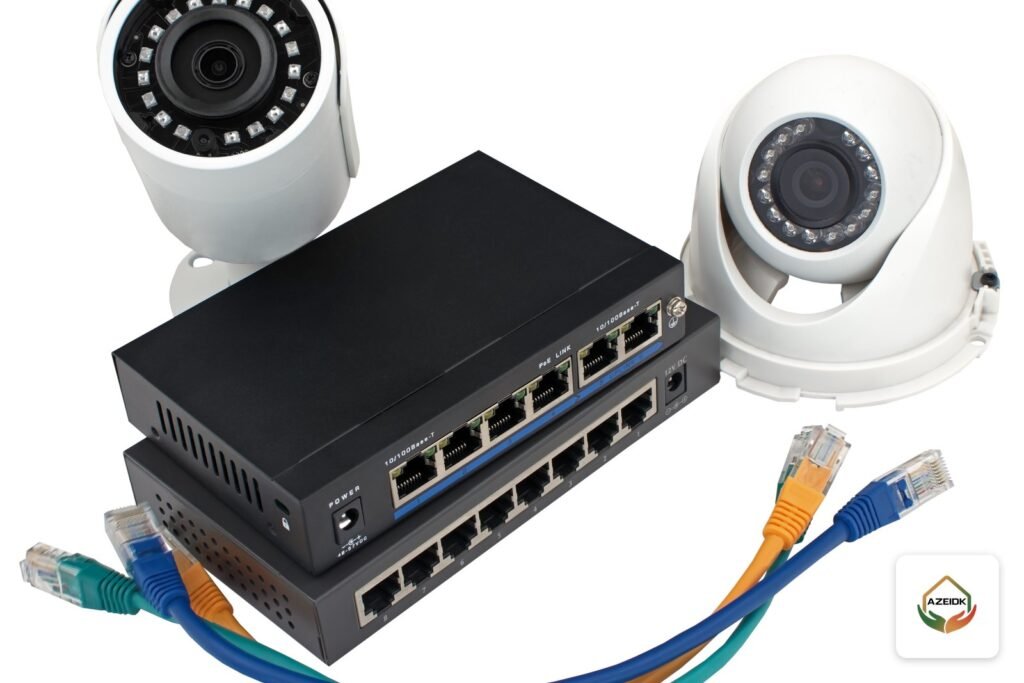
Wi-Fi cameras suit an apartment or a small shop entrance. If any case below applies, a wired system with IP cameras, a PoE switch and an NVR is the logical choice. How to pick the recorder itself is covered in our guide to choosing an NVR or DVR.
| Case | Wi-Fi | Wired (PoE with NVR) |
|---|---|---|
| Camera count | Few, each one uses router capacity | Many on one switch and one recorder |
| Distance from router | Inside the building and close | Boundary walls, car parks, remote gates |
| Continuous recording | On a card inside each camera | Central hard disk in the recorder |
| Power | A socket per camera | One cable carries data and power |
| Review and export | Per camera in the app | All cameras from one screen |
| Premises covered by the Security Surveillance Cameras Law | Confirm acceptance with the authority first | The usual choice on facility projects |
Shops and facilities covered by the law
The Security Surveillance Cameras Law and its executive regulation set the areas that must be covered, and bar licensing bodies from issuing or renewing a licence without a certificate confirming the installation requirements are met, as reported by Al Watan. Technical specifications and retention period sit in the specifications document, not in the published text. So do not buy a home camera for a regulated shop before confirming it is accepted. Details are in our article on the Saudi Security Surveillance Cameras Law.
At home you can mix both: wired cameras on the gate and boundary, a Wi-Fi camera indoors. Camera positions for apartments and villas are in our home CCTV installation guide, and model details in EZVIZ cameras for shops and homes.
Common mistakes with Wi-Fi cameras
- Testing the camera only next to the router, then finding a weak signal at its final position.
- Changing the Wi-Fi password or replacing the router without re-pairing the cameras, so alerts and viewing stop.
- Using a cheap card of unknown origin for continuous recording.
- Never opening old recordings until the day you need them.
- Leaving a weak app account password and sharing it with staff or visitors.
- Pointing an outdoor camera at the neighbours’ house or the public street more than needed.
- Using an indoor camera in an exposed outdoor spot.
Frequently asked questions
Are Wi-Fi cameras acceptable for shops?
For a small shop with no special requirements they are usually enough. Premises covered by the Security Surveillance Cameras Law need cameras and recording that match the specifications document, so confirm with the competent authority before buying.
Does a Wi-Fi camera record if the internet goes down?
Yes, if it has a microSD card and power, because local recording does not need internet. Only remote viewing, alerts and cloud uploads stop.
How do I view the cameras on my phone?
EZVIZ cameras are added to the EZVIZ app by scanning the QR code on the camera label and joining a 2.4 GHz network. For wired Hikvision and Dahua systems, see our guide to viewing CCTV cameras on your phone.
How much storage do I need for a month of recording?
It depends on resolution, bitrate, codec and whether recording is continuous or motion-based. Calculate it per camera before choosing a card or hard disk. If a card cannot hold a month, a wired system with a recorder fits better.
Is audio recording allowed on CCTV cameras?
In premises covered by the law, the executive regulation prohibits enabling audio recording without approval from the competent authority. Many Wi-Fi cameras have a microphone, so switch audio off without approval.
What drives the price of a camera system?
The number and resolution of cameras, the storage method (card, cloud subscription, or recorder and hard disk), and the power and cabling work on site.
Can I share a home Wi-Fi camera with family members?
Yes. In the EZVIZ app you can share a device with a family member or someone you trust, with full or partial permissions, and stop sharing later from the user list, without giving out your account password.
Can I pause an indoor camera while the family is at home?
Most EZVIZ cameras support sleep mode in the app. When it is on, live view, recording and motion detection stop until you switch the camera back on.
Conclusion
A Wi-Fi camera is a quick option for a few cameras near the router, if you test the signal at the final position and pick storage by the risk you care about. For larger areas, more cameras or regulated premises, cable and a recorder become the backbone and Wi-Fi cameras an indoor add-on.
Not sure whether to go Wi-Fi or wired? Send us the number of points, a simple sketch of the router and camera positions and the type of premises, and we will propose the layout and suitable EZVIZ or Hikvision models. Talk to the AZEIDK team
Related guides
- Salamah Certificate for Hotels and Serviced Apartments: Required Systems and Steps Before Inspection
- Factory and Industrial Fire Protection: Engineering Guide
- Dahua in Saudi Arabia: Cameras, Intercom and Turnstiles from AZEIDK
- General Contracting in Dammam and Khobar: How to Choose a Contractor for MEP and Fire Works