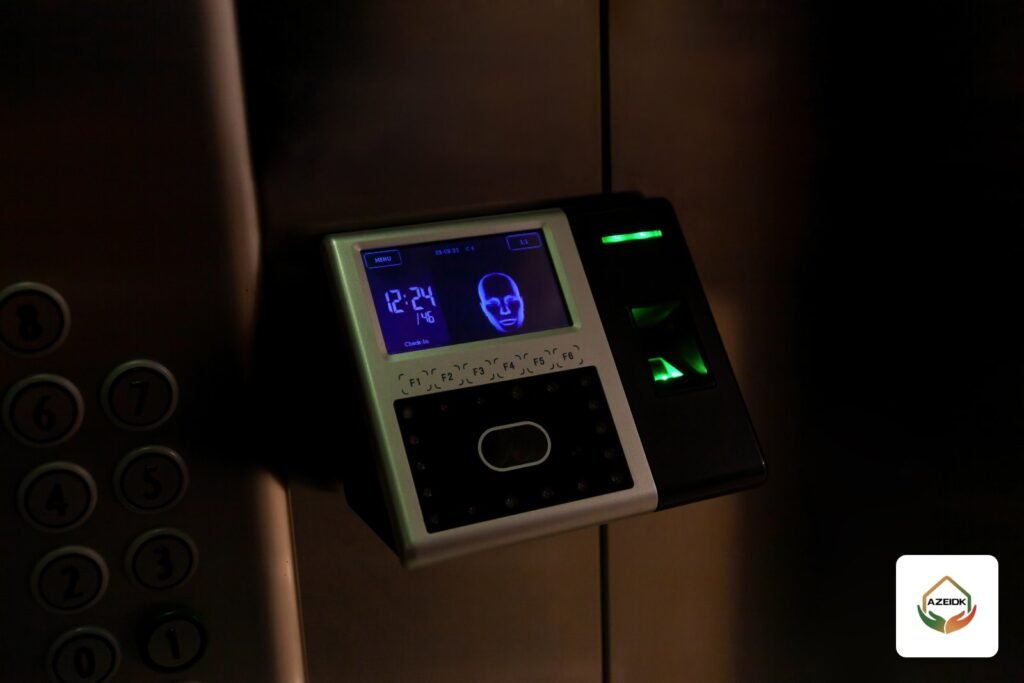
A Hikvision access control system is usually built around a door controller such as the Hikvision DS-K2801 controller with card readers, or around a face recognition terminal that drives the door lock itself, with iVMS-4200 on a PC to manage people, permissions and schedules. The Hik-Connect mobile app adds remote door opening and event review on devices that support it. This article covers the components AZEIDK supplies in Saudi Arabia, the setup steps as Hikvision’s manuals describe them, and the mistakes we keep seeing on site.
Key takeaways
- The DS-K2801 controls one door, takes two Wiegand readers (entry and exit) and stores up to 10,000 cards and 50,000 records per its datasheet.
- The DS-K1T321MFWX face terminal combines face, fingerprint, card and PIN, with up to 500 faces, 3,000 fingerprints and 3,000 cards.
- First activation is done with SADP or from iVMS-4200, followed by adding the device, enrolling people and setting permission and schedule templates.
- Hik-Connect is useful for remote door opening and event review, but full permission management normally stays on the PC.
- Any door on an escape route must be coordinated with the fire alarm system before installation.
In this article
- What is Hikvision access control and what are its parts?
- Hikvision DS-K2801 controller: specifications and functions
- Hikvision face recognition terminals (MinMoe) and the model AZEIDK supplies
- Controller or standalone face terminal?
- Hikvision access control setup with iVMS-4200
- Hikvision access control software: iVMS-4200 or Hik-Connect?
- Hikvision door access control and fire safety
- Common installation mistakes
- Frequently asked questions
- Conclusion
What is Hikvision access control and what are its parts?
An access control system decides who opens a door and when. In Hikvision’s range the parts fall into four groups:
- Controller: the board installed inside the secured area. It receives the reader signal, drives the lock relay and reads the door contact and exit button.
- Reader: a card or fingerprint reader, usually wired to the controller over Wiegand.
- Face recognition terminal: verifies the person and drives the lock itself, or works as a reader for a controller.
- Software: iVMS-4200 on the PC, the Hik-Connect app on the phone, and central management platforms on larger projects.
Then there is the lock itself (magnetic or electric strike), the power supply, the exit button and the door contact. These are normally not included with the controller and should be in the BOQ from day one. Supply and installation of these systems sit under AZEIDK’s security and surveillance solutions.
Hikvision DS-K2801 controller: specifications and functions
Hikvision lists the DS-K2801 in its Value series of card access controllers, for a single door. The figures below come from AZEIDK’s product page and Hikvision’s user manual for the DS-K2800 series:
| Item | DS-K2801 |
|---|---|
| Doors | One door, lock relay output (NC/COM/NO, dry contact) |
| Readers | Two Wiegand ports (entry and exit reader for the same door), W26 and W34 |
| Inputs | Exit button, magnetic door contact, one alarm input |
| Alarm output | One relay (dry contact) |
| Capacity | 10,000 cards and 50,000 card swipe records |
| Network | TCP/IP |
| Power | 12 VDC |
| Operating temperature | 0 to 45 °C |
Functions listed in the user manual include first card opening, super card, duress code, visitor cards with a set number of uses, anti-passback, event linkage and remote door control. Note the temperature limit: 45 °C maximum. Mount the controller indoors in a conditioned room or enclosure, not in a metal box outside in the sun.
Hikvision face recognition terminals (MinMoe) and the model AZEIDK supplies
Hikvision uses the MinMoe name for its face recognition terminals for access control and time attendance. According to IFSEC’s report at launch, the family covers Value, Pro and Ultra series plus face modules for turnstiles. Names and groupings vary by region and catalogue date, so the datasheet is always the reference.
The model AZEIDK supplies is the Hikvision face access terminal, described in its datasheet as a Value Series Face Access Terminal, model DS-K1T321MFWX:
| Item | DS-K1T321MFWX |
|---|---|
| Screen and camera | 2.4-inch LCD, 2 MP lens |
| Authentication | Face, fingerprint, M1 card, PIN |
| Capacity | 500 faces, 3,000 cards, 3,000 fingerprints, 150,000 events |
| Recognition time | Under 0.2 s per user |
| Interfaces | Lock, exit button, door contact, RS-485, USB, network port |
| Connectivity | Wired network and Wi-Fi (AP mode), ISAPI and ISUP 5.0 |
| Power | 12 VDC, up to 6 W |
| Operating temperature | -10 to 55 °C |
A 500-face capacity suits an office, a small facility or a side entrance. With more staff, or several doors under one management, the answer is usually a controller with readers, or a higher-tier terminal quoted per project. If you only need attendance records, look at the Hikvision DS-K1A8503EF time attendance terminal.
Controller or standalone face terminal?
| Situation | Better fit | Why |
|---|---|---|
| One office door, limited users | Standalone face terminal | Drives the lock directly, simpler install |
| Door needing entry and exit readers | DS-K2801 with two Wiegand readers | Two readers per door, anti-passback supported |
| Server room or sensitive store | Controller inside the secured area | The relay is not on the outside of the door |
| Several doors, central management | Controllers with iVMS-4200 | One set of permissions and schedules for all doors |
| Turnstiles or car park barriers | Integration with the gate | Depends on gate type, see our access gates guide |
One security point: a standalone terminal on the outside wall carries the lock relay inside it. On sensitive doors, let the outside device act as a reader only and keep the relay in a controller on the secure side.
Hikvision access control setup with iVMS-4200
The steps below summarise Hikvision’s DS-K2800 series user manual. Always follow the manual for your exact model, because menus change between software versions.
- Wire and check: connect the reader, lock, exit button and door contact to the terminal diagram, then the 12 V supply and the network cable.
- Activate: a new device must be activated with a strong password before use, through SADP or from iVMS-4200. The DS-K2801 manual gives the default IP as 192.0.0.64 on port 8000.
- Network settings: set an IP address that fits the site network and enable NTP time sync so records carry the right time.
- Add the device to iVMS-4200: by IP address, port, user name and password.
- Enrol people and credentials: add staff and register cards, faces or fingerprints depending on the device.
- Permission and schedule templates: define who may use which door and when, then apply the permissions to the devices.
- Events and linkage: enable event upload, set the door-held-open alarm and test event search.
- Test: try every case: valid card, rejected card, exit button, door held open and network loss.
Per its datasheet, the DS-K1T321MFWX can also be configured from a web client on a PC or phone. Programming and linking the devices falls under our programming and systems integration service.
Hikvision access control software: iVMS-4200 or Hik-Connect?
Many clients want a single phone app to run everything. In practice each tool has its own job:
| Item | iVMS-4200 (PC) | Hik-Connect (mobile) |
|---|---|---|
| Main use | Setup and daily administration | Monitoring and quick control |
| People and permissions | Yes, with permission and schedule templates | Team mode only, per the app datasheet |
| Remote door opening | Yes | Yes, on supported devices |
| Event search | Yes | History event search |
The Hik-Connect datasheet (version 6.7.0) lists remote door control and event search, but its compatible device list names recorders, cameras, video intercom and security control panels. Confirm that your controller model supports the app before promising it to a client. The DS-K1T321MFWX datasheet lists ISUP 5.0 and the Hik-Partner Pro installer platform.
If the site already has Hikvision CCTV, cameras and door events can be viewed together in iVMS-4200. On small sites an 8-channel Hikvision NVR does this job.
Hikvision door access control and fire safety
A magnetic lock stays locked while it has power. If the door is on an escape route, the lock must release on fire alarm and people must be able to leave without a card. This is normally done with an output from the fire alarm panel that cuts lock power, plus an emergency break-glass release next to the door. The exact requirements come from the codes adopted on your project and Civil Defense conditions, so coordinate the door design with the fire alarm system designer before installation, not after.
Common installation mistakes
- Weak or shared passwords across devices, or firmware never updated.
- Lock and controller on one supply with no current check, so the controller reboots when the lock fires.
- Door contact not wired, so no door-forced or held-open alarm.
- Wiegand cable too long or the wrong type, causing bad reads. Stay within the reader manual’s limits.
- Clock not set, which makes records useless in an investigation.
- No fire alarm release on escape-route doors.
For a new project, start with a technical site inspection to list the doors, lock types and cable routes.
Frequently asked questions
Which Hikvision access control software should I use on a PC?
For small and medium sites, Hikvision’s iVMS-4200 handles activation, enrolment, permissions, schedules and event search. Large multi-building projects may need a central management platform chosen per project.
Where can I find the Hikvision access control manual?
Hikvision publishes a user manual and quick start guide for each model. The datasheet is on the AZEIDK product page, and our team can send the manual with the quotation.
How many cards does the DS-K2801 hold?
Up to 10,000 cards and 50,000 swipe records per the datasheet, for one door with an entry and an exit reader.
Does Hikvision face recognition access control also take fingerprints and cards?
The DS-K1T321MFWX supplied by AZEIDK supports face, fingerprint, M1 card and PIN, with 500 faces, 3,000 fingerprints and 3,000 cards.
Can I open the door from my phone with Hik-Connect?
The app supports remote door opening on compatible devices. Check model support before buying, and give each person limited user rights.
What drives the cost of a Hikvision door access control system?
Number of doors, device type (card or face), lock type and door condition, cable distances, integration with fire alarm and CCTV, and number of users. Pricing follows a site survey.
Conclusion
Hikvision access control works well when the device matches the door and the user count, is activated with a strong password, is managed from iVMS-4200 and is tied to the fire alarm on escape doors. The DS-K2801 suits doors that need two readers and a controller on the secure side, while the face terminal suits office doors with a limited number of users. The rest of the range is on our Hikvision brand page.
Planning access control for your office or building? Send the number and type of doors and the user count, and the AZEIDK team will prepare the technical selection and a supply and installation offer. Talk to the AZEIDK team