An apartment fire alarm hush button is a small unit installed in each flat and connected to the building’s addressable fire alarm loop. It detects fire inside the dwelling, sounds a local alarm there, and lets the resident silence it for a short period when the cause is cooking smoke, so one burnt pan does not turn into a full tower evacuation.
This article explains how the Context Plus Hush Button XFP508X works on an addressable loop, what the communal panel sees from each flat, when a residential tower needs it, and what the consultant should write into the specification. All figures come from the AZEIDK product page and the Context Plus catalogue.
Key Takeaways
- The Context Plus catalogue describes the XFP508X as a miniature, fully monitored single-zone fire panel that sits on, and is powered from, the Context Plus addressable loop.
- Each dwelling gets a two-minute local silence facility and a 15-minute isolate facility, with an internal buzzer that sounds when the hushed period is due to expire.
- Each unit takes up to 10 conventional detectors and 10 manual call points, a sounder circuit load of up to 30 mA, and up to 100 m of circuit cable.
- Up to 20 units per loop, limited by the host panel’s output current and the other devices on the same loop.
- Open and short circuit faults on the dwelling circuits show on the unit and at the communal panel, and events are logged at the main panel.
In this article
- Why does cooking smoke evacuate the whole building?
- What is an apartment fire alarm hush button?
- How does the unit work on the addressable loop?
- Two-minute silence vs 15-minute isolate: what is the difference?
- What does the communal panel see from each flat?
- What is installed inside the flat?
- When does a residential tower need a hush button?
- What should the consultant specify?
- Common installation mistakes
- Frequently Asked Questions
- Conclusion
Why does cooking smoke evacuate the whole building?
In many residential towers the detector inside each flat sits on the same loop as the corridors and is programmed to trigger the general alarm the moment it operates. Frying, shower steam or incense in one flat sets off sounders on every floor.
After a few alarms with no fire, residents learn to ignore the sound, and some ask the operator to disable the apartment zones at the panel. The building then has no real detection inside the flats. We covered the causes and how to trace them from the panel log in Fire Alarm False Alarms: Causes and Solutions. Here we focus on one design answer: separating the local alarm in the flat from the general alarm while keeping full supervision.
The Context Plus catalogue states directly that the Hush Button reduces the likelihood of unnecessary building evacuations, system vandalism and a true alarm being ignored.
What is an apartment fire alarm hush button?
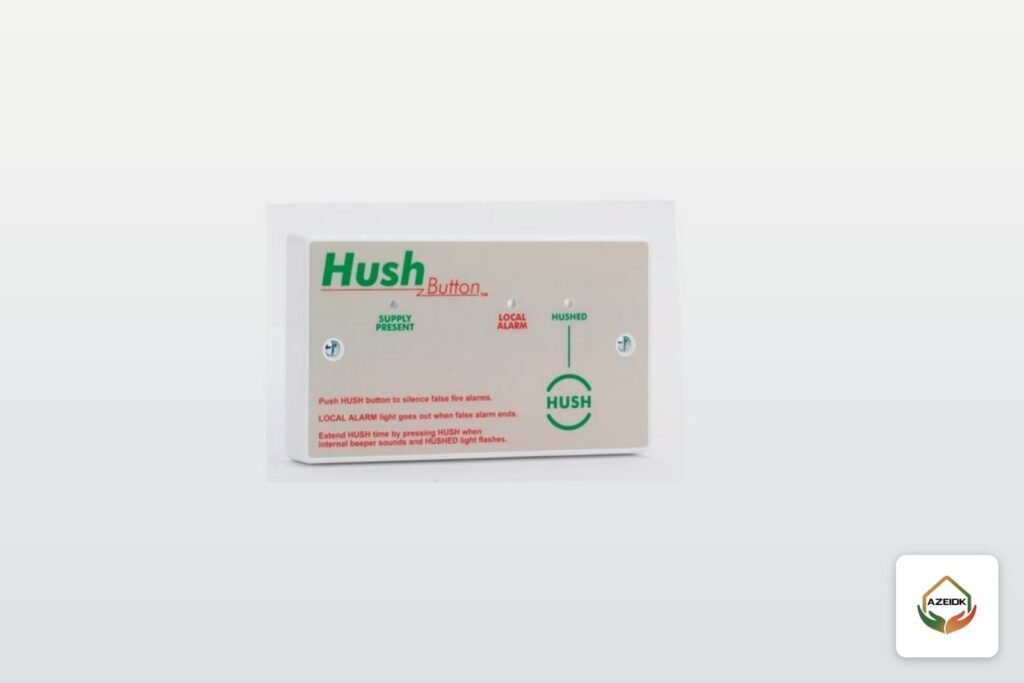
The catalogue describes the XFP508X as a miniature, fully monitored single-zone fire panel on the Context Plus addressable loop. The AZEIDK product page says it is intended mainly for flats, apartments and multi-dwelling buildings, giving each dwelling independently monitored detection, alarm and silencing.
In practice, each flat has a small conventional system of detectors, call points and a sounder, headed by one addressable unit that represents the whole flat on the loop.
What does the resident see?
The front of the unit has three user indicators: Supply Present, Local Alarm and Hushed, plus the hush button itself. An internal buzzer sounds when the hushed period is about to expire, so the resident knows the alarm will return if the smoke is still there.
What does the engineer see?
There is an engineer indicator for open or short circuit faults on the dwelling circuits, and the catalogue states that this fault is also shown at the host panel. An open or short circuit in a flat does not go unnoticed by the control room.
How does the unit work on the addressable loop?
In the catalogue diagram, the Context Plus XP95 analogue loop runs from the communal addressable panel through corridor detectors, call points and sounders, then through a Hush Button for each flat. From each unit, conventional circuits run to the detectors, sounder and call point inside the flat, each ending in an end-of-line (EOL) device that allows open and short circuit monitoring.
- Loop powered: no separate power supply is needed in the flat. Operating voltage is 17–40 V DC and quiescent current is 5 mA.
- Onboard loop isolator: a short on one part of the loop does not take down the remaining flats and corridors. See Loop Isolators in Addressable Fire Alarm Systems.
- Units per loop: up to 20 Hush Buttons per loop. The catalogue diagram adds that this depends on the host panel output current and the devices connected.
So 20 is a ceiling, not a target. The actual number is settled by the loop load calculation at design stage.
Two-minute silence vs 15-minute isolate: what is the difference?
| Facility | Duration per catalogue | Example use |
|---|---|---|
| Local silence (hush) | 2 minutes | The resident knows the cause is cooking or steam and silences the flat while the room clears |
| Isolate | 15 minutes | Isolating the flat for a limited time, for example during maintenance or finishing work inside it that raises dust |
| Expiry warning | Before the hushed period ends | Internal buzzer reminds the resident the alarm will return if the cause remains |
In both cases the silence is temporary and time-limited, not a permanent disconnection. That is the key difference from residents removing a detector head or covering it with a bag.
What does the communal panel see from each flat?
The catalogue states two things: open and short circuit faults on the dwelling circuits are shown at the host panel, and logging at the main communal panel gives full traceability of any problems. The Context Plus XFP panel datasheet, for example, lists 999-event monitoring.
What happens after an alarm in a flat, whether it stays local for a period and then escalates, alerts the guard only, or sounds the floor, is not a fixed feature of the unit. It is a design decision made by the consultant in the cause and effect matrix, programmed into the panel and tested at handover. It should be written into the specification, not left to the programmer.
For compounds with several buildings, panels may be networked to a single security room. See Networked Fire Alarm Panels for Multi-Building Sites.
What is installed inside the flat?
| Item | Value in the Context Plus catalogue |
|---|---|
| Conventional detectors per unit | Up to 10 |
| Manual call points per unit | Up to 10 |
| Maximum sounder circuit load | 30 mA |
| Maximum detector and sounder circuit cable length | 100 m |
| Cable | Fire-resistant screened cable, 2 x 2 core (2 cores per circuit), or 1 x 3 core with common 0 V |
| Circuit monitoring | Open and short circuit |
| Dimensions | 144 x 84 x 37 mm (W x H x D) |
The 30 mA sounder limit is the item most often missed. Add up the operating current of the selected conventional sounders from each datasheet and confirm it stays within this limit.
Common practice in residential buildings is a heat detector in the kitchen instead of a smoke detector, with smoke detectors in the living area and bedrooms per the approved design. The hush button complements this choice; it does not replace it.
When does a residential tower need a hush button?
The mandatory reference in Saudi Arabia is the Saudi Fire Protection Code SBC 801 within the Saudi Building Code. The 2024 edition has been mandatory since 30 June 2025, the General Directorate of Civil Defense oversees its requirements, and facility safety licences are issued and renewed through its Salamah platform. The consultant sets the required system for each building by its classification. Residential requirements are covered in Fire Alarm Systems for Residential Buildings.
The hush button is not an item the code names; it is a design approach the consultant proposes and gets approved within the drawings. It is worth considering for:
- Towers or buildings with many flats on an addressable system where detection is needed inside the flats, not only in corridors.
- Existing buildings suffering repeated alarms from flats.
- Serviced or furnished apartments with changing occupants.
A villa or small building on a conventional system with few zones may not need this approach. Acceptance of local silencing, its duration and the alarm behaviour after it remains the consultant’s decision under the code and the authority having jurisdiction.
What should the consultant specify?
- Protocol compatibility: the unit runs on the Context Plus addressable loop, so the panel and loop must be from the same system.
- Loop load calculation: units per loop (up to 20) with all other devices, against the panel output current, with spare capacity.
- Device list per flat: detector type per room, call points if any, and sounder current within 30 mA.
- Cabling: fire-resistant screened cable type and core count, with the longest run in the flat within 100 m.
- Cause and effect matrix: what happens on a flat alarm, after the silence period, on a corridor or stair alarm, and on a dwelling circuit fault.
- Unit location: near the flat entrance or internal hallway, easy for the resident to reach and visible to maintenance staff.
- Handover testing: alarm, silence, silence expiry, isolate, open and short for every flat, confirming each event appears at the communal panel as per the matrix.
- Resident guidance: a label in each flat explaining when to press the button and when to evacuate.
Common installation mistakes
- Loading the loop to the maximum number of units without calculating loop current with the other devices.
- Adding a second sounder in the flat without checking the 30 mA limit.
- A smoke detector in the kitchen, relying on the button to silence it daily.
- Leaving the cause and effect matrix at default programming without consultant approval.
- Omitting the end-of-line device, or fitting it at the unit instead of the last device on the circuit, so the circuit is not truly monitored.
Frequently Asked Questions
How do I silence a fire alarm in my flat without evacuating the building?
Through a design that separates the local alarm from the general alarm, such as a Hush Button in each flat. The resident presses it to silence the flat for two minutes while the unit stays monitored by the building panel.
Does a hush button disconnect the smoke detector?
No. Silence is limited to two minutes and isolate to fifteen minutes; neither is a permanent disconnection. An internal buzzer sounds before the hushed period ends.
How many Hush Buttons can go on one loop?
Up to 20 XFP508X units per loop according to the Context Plus catalogue, with the real number depending on panel output current and other loop devices.
How many detectors can each flat have?
Up to 10 conventional detectors and 10 manual call points per unit, with a sounder circuit load of up to 30 mA and up to 100 m of cable.
Does the unit need separate power in the flat?
No. It is powered from the addressable loop at 17–40 V DC, with a quiescent current of 5 mA.
Does the unit state compliance with BS 5839-6?
The published catalogue page for the unit does not state compliance with a specific standard. If the project specification requires one, request a manufacturer declaration in the technical submittal.
Is a hush button enough to stop false alarms in a building?
Not on its own. Start with the right detector for each room, such as a heat detector in the kitchen, and regular maintenance; local silence then handles the remaining cooking alarms.
Conclusion
An apartment fire alarm hush button solves one specific problem: a cooking alarm in one flat evacuating a whole tower and teaching residents to ignore the sound. The XFP508X addresses it with a short local silence and a time-limited isolate while the flat stays monitored on the Context Plus loop. Its real value is set at design stage: loop load, sounder current limit, detector selection and an approved cause and effect matrix. See AZEIDK fire alarm solutions for the rest of the system.
Designing a fire alarm system for a residential tower, or dealing with repeated alarms from flats? Send us the number of floors and flats and the existing or proposed panel, and we will review Hush Button allocation per loop and the devices per flat with you, together with the product catalogue. Contact the AZEIDK team
Related guides
- 360 Degree Camera Guide: EZVIZ and Dahua Pan-Tilt Cameras, Real Rotation Angles, Storage and Mounting
- Gas Suppression Release Sequence: Context Plus EP203 Panel, Hold and Abort Buttons and Release Call Points
- Fire Pumps: Types (Electric, Diesel and Jockey, End-Suction, Split-Case and Vertical Turbine) and NFPA 20 Basics
- Car Park Carbon Monoxide Detection and Extraction Fan Control: Komttech VCO800 and VSO-800